
Before and after slider: what it is and how to use it
Quick facts
- Definition
- Visual component that shows two images of the same face overlaid, with a line the user drags to reveal one or the other.
- Use in the consultation
- Lets the patient see the difference between the current situation and the simulation, in the same framing.
- Condition to work
- Both images must have the same angle, size and framing.
- Ethical care
- A simulation is not a result: never present it as if it were a treatment already performed.
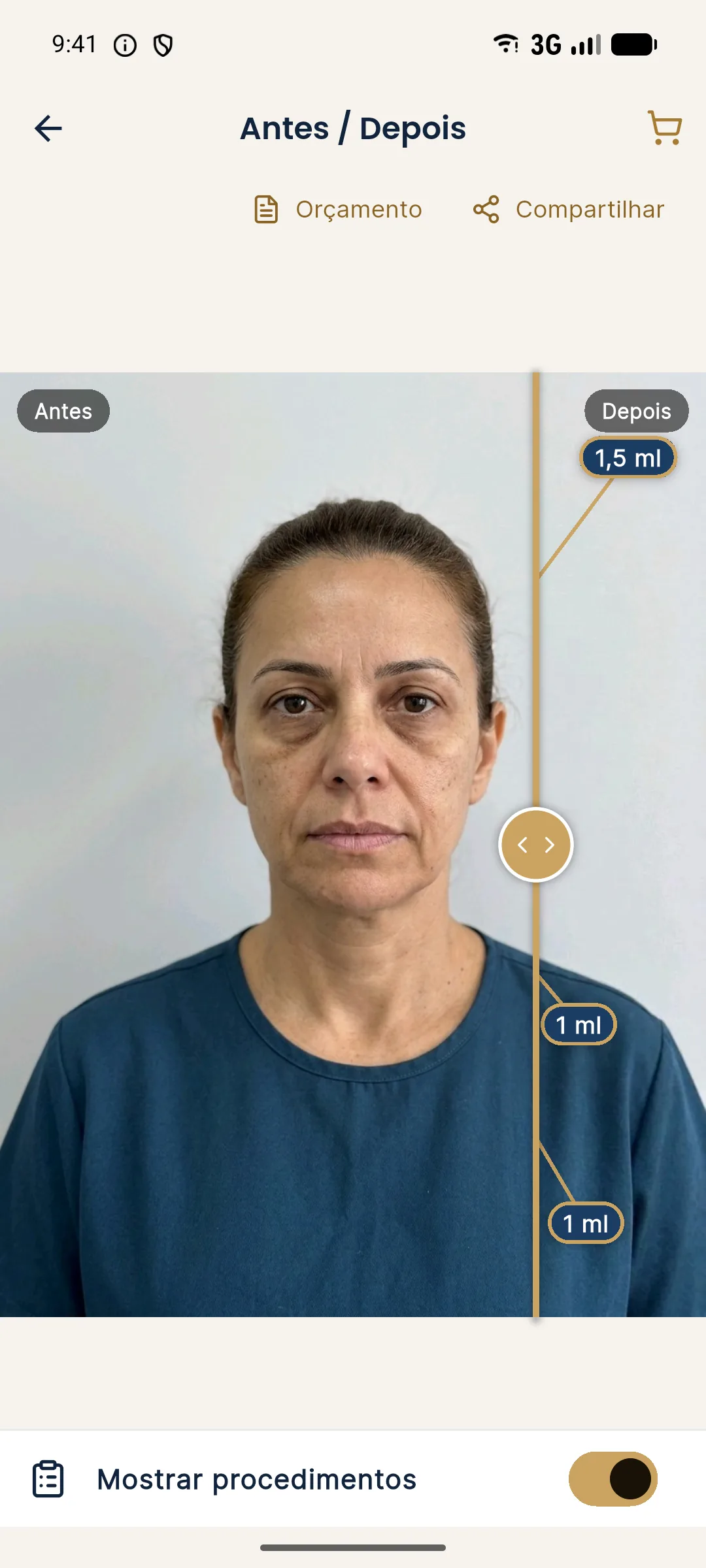
The before and after slider is a visual feature in which two images of the same face are overlaid, separated by a line that the user drags with a finger or the mouse. On one side the starting image appears, on the other the modified one. As they slide, the person sees precisely what changed, without having to switch between two photos.
Why does it work better than two photos side by side?
Two images side by side force the eye to hunt for differences. In the slider, the framing is the same, and the difference appears exactly where the line passes. The gaze stays on the areas that really changed, and the dragging gesture gives the patient control over what they see.
| Aspect | Photos side by side | Slider |
|---|---|---|
| Comparison | The eye alternates between two positions | The difference emerges at the same point |
| Patient participation | Passive | Active, through the gesture |
| Requirement | Similar photos | Overlaid photos with the same framing |
| Risk of misleading | Lower, since two photos are clearly shown | Higher if the framing hides differences in light or pose |
For the slider to be honest, both images must have the same angle, the same distance and the same lighting. When that is not the case, the apparent difference comes from the photo and not from the treatment.
What is it like in Harmy?
In Harmy, the slider is the central result screen. The professional drags the gold line to reveal the "after" simulation over the patient's photo, and two fingers zoom the image. The "Show procedures" button displays the ml of each area over the "after". There is also a presentation mode, in full screen, for turning the phone toward the patient, and the patient link, which opens the slider on the patient's phone with the clinic's logo and contact.
How to use it well in the consultation?
The slider is a conversation tool. The ideal is to use it after hearing the concern, to show what is possible, discuss expectations and agree on the plan. It helps align what the patient imagines with what the professional considers feasible.
When the patient understands the proposal, they tend to decide with more confidence, which can show up in the acceptance rate. The approach relates to consultative selling, in which the professional guides instead of pressuring.
And in advertising?
This is where the greatest care is needed. A simulation presented as the before and after of a real treatment is one of the most direct paths to misleading advertising. Even with real photos of patients, an image use release is needed, along with respect for the professional board's rules. The page on what may be publicized details these limits, under the rules in force in Brazil.
Also called: before and after comparer, image comparison slider, before and after slider.
Frequently asked questions
Can the before and after slider be used to advertise results?
If the images are simulations, no. Presenting them as real results can amount to misleading advertising. Even with real photos, there are rules from the professional board and the advertising code to follow.