
How to Choose ml from 0.5 to 5 per Area in Harmy
Volume is the most intuitive control in the Plan: you raise or lower the ml of each area and the projection responds. But the number only makes sense if you understand what it represents in the app, what it doesn't represent and how to choose values that help the conversation instead of inflating expectations.
What does ml represent in Harmy?
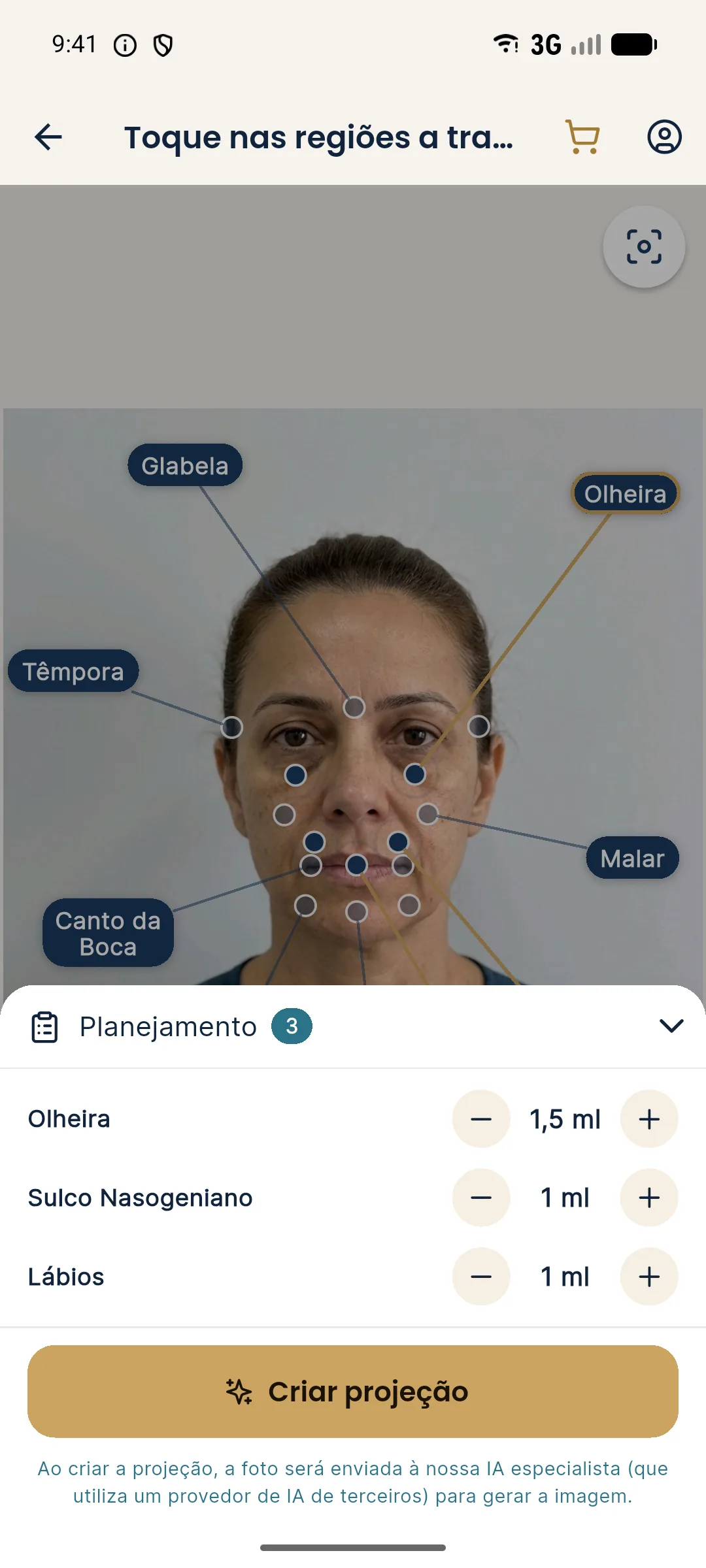
The ml tells the AI how much you intend to change in that area. The more ml, the more noticeable the change in the projection, within a limit: the image stays subtle, because the AI preserves the skin, expression, background, hair and lighting of the photo. The number illustrates the intent of the plan and does not measure the clinical outcome.
| Item | How it works in the app |
|---|---|
| Range | From 0.5 to 5 ml per area |
| Step | 0.5 ml (− and + buttons) |
| Starting value | 1 ml |
| Bilateral area | The ml is the total for both sides |
| Glabella | Symbolic intensity value, since toxin is not measured in ml |
Ml and intensity: two different controls
Each area also has an intensity of Subtle, Moderate or Pronounced (default Moderate). The ml is the amount; the intensity is how much the AI lets the effect show. To understand the difference, see ml and intensity in Harmy: what's the difference.
How to choose the value for each area
Use the volume you would really apply, within the usual range for the area and at the discretion of the qualified professional after assessment. The Plan doesn't tell you what is "right": the app only reflects your plan.
The Plan shortcuts (First time, Maintenance and Full harmonization) fill in starting values that you adjust. None of them is a protocol.
Step by step
- Mark the areas in the plan.
- Open the Plan with the arrow at the bottom.
- Use − and + to adjust the ml of each area.
- Choose the intensity, if you want to change the default Moderate.
- Check the total and tap Create projection.
Volume on bilateral areas
Tear trough, cheekbone, temple and nasolabial fold exist on both sides. At these points, the ml entered is the total. The projection splits it into two halves. So 2 ml on the cheekbone in the projection means 1 ml on each side.
Tips
- Avoid choosing the value by looking at the image. Choose by the plan and look at the image afterward.
- Don't promise the projection's volume. The final volume is set at the in-person assessment.
- Turn on Show procedures to show the patient the ml of each area over the after and tie the number to what appears.
- Review the quote: the ml in the Plan go straight into the PDF table. See building the quote by ml in Harmy.
For the conceptual basis, read the glossary entries on ml and volumization.
Hypothetical example of the reasoning
Hypothetical example: a patient arrives with a main concern of thin lips and, at the assessment, you also notice loss of support at the cheekbone. You decide to propose 1 ml in the lips and 2 ml in the cheekbone, at Moderate intensity. In the Plan, the cheekbone goes in as 2 ml (the total for both sides) and the lips as 1 ml. The projection comes out subtle, and that is what you tell the patient: the image illustrates the plan but does not replace the in-person assessment or the adjustment at the time of application.
Note that the reasoning comes from the clinical case, not from the button. The app only translates your plan into an image. If, after the conversation, the plan changes, generate a new projection with the revised values, instead of trying to explain an image that no longer represents what you intend to do.
Frequently asked questions
What is the ml range per area in Harmy?
From 0.5 to 5 ml per area, in steps of 0.5 ml. Each marked area starts at 1 ml in the Plan.
For a bilateral area, do I enter the ml for one side or both?
Both. The ml entered is the total, and the projection splits that volume between the two sides. For 1 ml on each side, enter 2 ml.
Does more ml always change the image more?
Generally yes, the projection becomes more noticeable with more ml, but it stays subtle by design. The volume is not a clinical measure of the outcome.
Is the glabella volume in ml?
No. Toxin is not measured in ml; on the glabella the control is a symbolic value that indicates the projection's intensity.