
Building a quote by ml in Harmy

After the patient has seen the projection, the natural question is: how much does it cost. Harmy uses what you already marked, the areas and the ml of each, to build a quote by ml without a spreadsheet. The logic is simple, but there are presentation details that make a difference.
How does the quote by ml work?
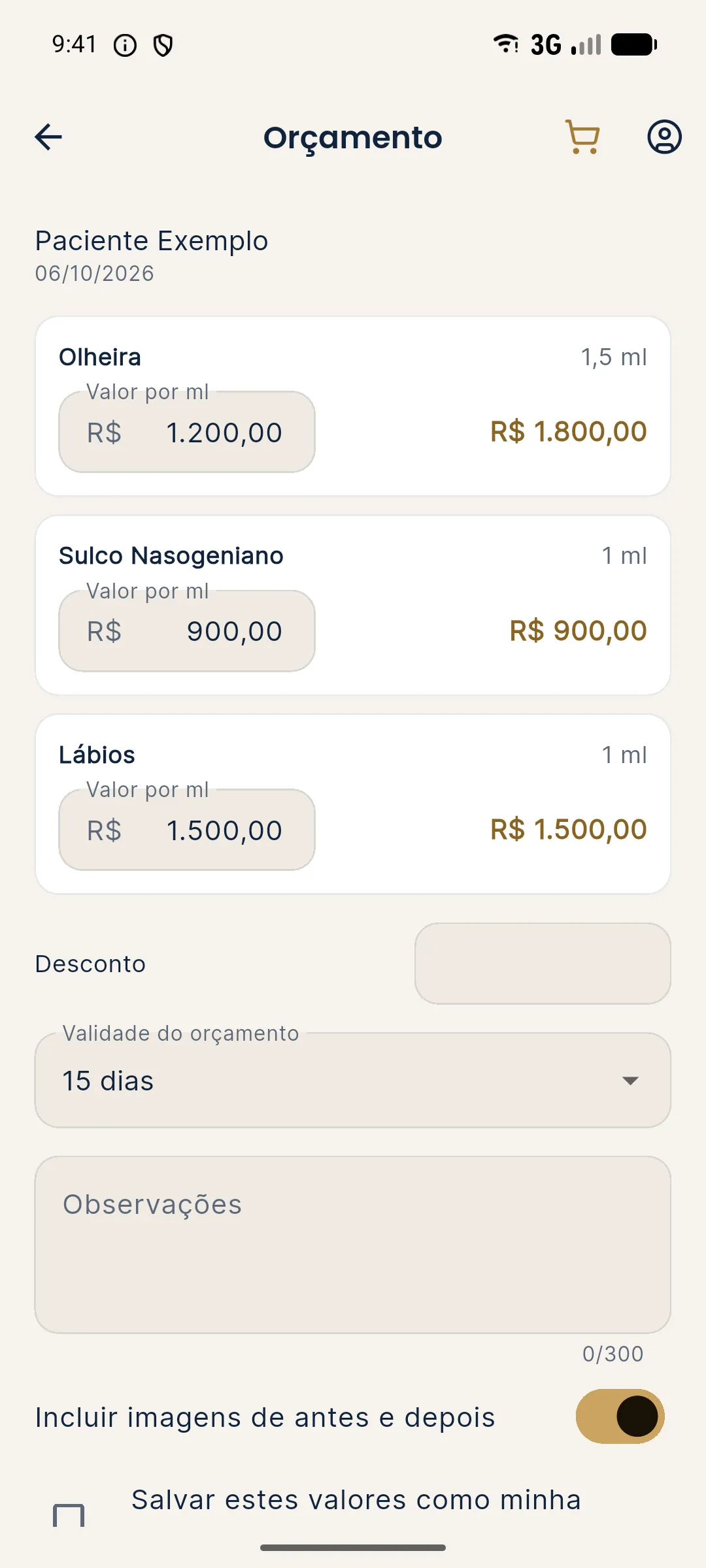
The quote uses the ml of each area in the Plan and the price per ml you set for it. The result per area is the product of the two, and the total is the sum. That is what pricing per ml discusses in detail from the commercial side. In the app, the quote screen appears after the projection has been created.
What do you configure?
- Price per ml for each area, which can be saved in My clinic and reused.
- Discount, if any.
- Validity, in days.
- Notes, for agreed conditions.
- Images, optional, to include the projection in the PDF.
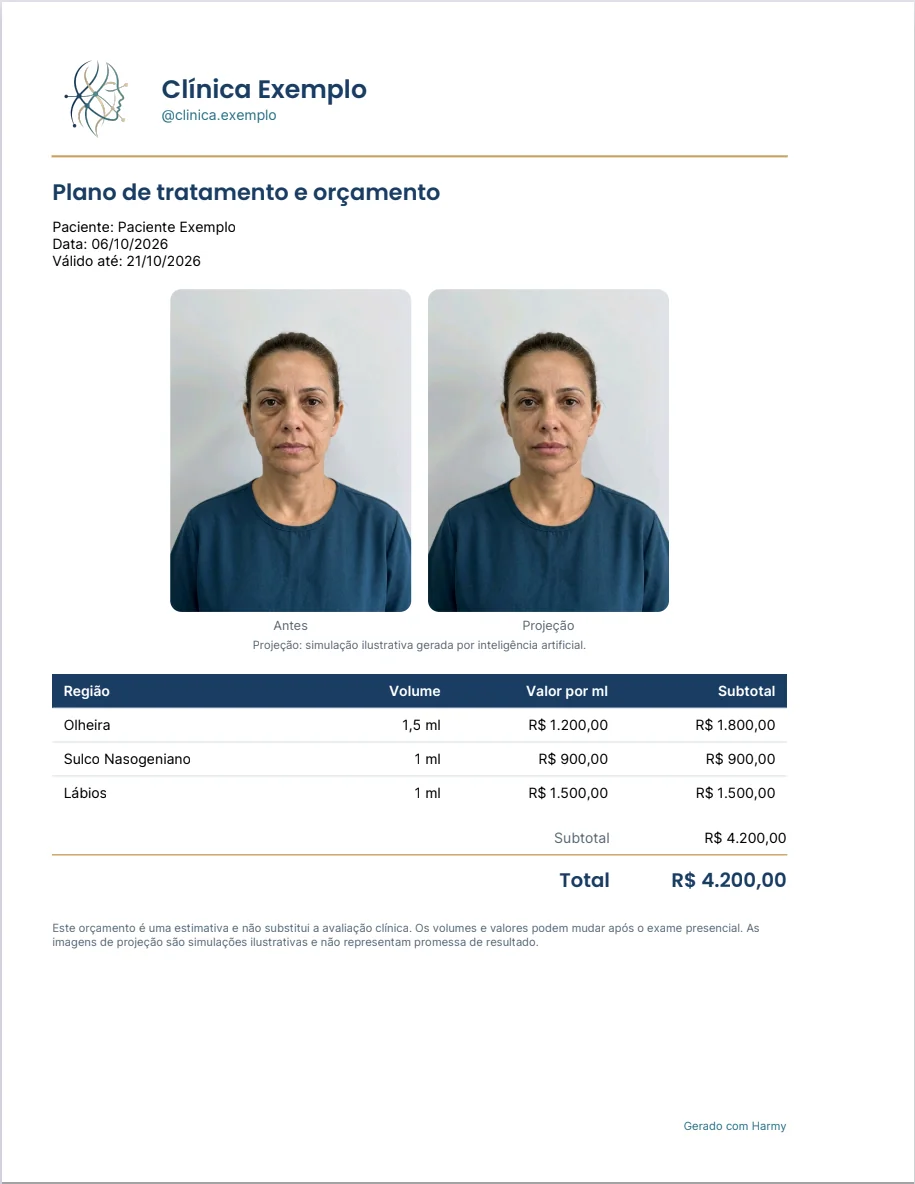
The PDF comes out with the clinic's name and logo, and includes informational installments and a notice. To set up your identity, see My clinic, logo and branding. The step-by-step for the file is in PDF quote.
Is a quote by ml the best way to charge?
It depends on the clinic. The ml is a unit the patient understands, but it can invite price comparison between professionals. Many prefer to present by area or by plan. The app lets you see the ml, and how to present is up to you. To think it through, see how to explain the quote by area.
| Way of presenting | Advantage | Caution |
|---|---|---|
| By ml | Transparent, easy to adjust | Invites comparing the price per ml |
| By area | Simpler for the patient | Less flexible if the volume changes |
| By plan | Eases the decision | Requires explaining what is included |
Best practices for delivery
Send the PDF right after the consultation, with the validity in days visible. If you include projection images, keep the illustrative simulation notice, which is part of the file. Do not present the image as a guaranteed result, and follow your professional board's rules on advertising prices and images.
Final tip
If you have not yet registered your price table, do it once in My clinic and save time on every following quote. To understand the full routine, see using Harmy in the first consultation.
Example of putting a quote together
A hypothetical example, just to illustrate the math: a plan with Cheekbone 2 ml and Lips 1 ml, with prices per ml that you set for each area. The app calculates the value of each line by multiplying the ml by the price per ml, adds up the lines and applies the discount, if any. The validity in days appears in the PDF, and the installments are only informational, to give the patient an idea of how the amount could be divided.
Two practical cautions. The first is to check that the quote's ml match what you actually intend to propose: the projection's ml came out of a conversation and may need adjusting after the assessment. The second is to use the notes field to record conditions, such as the need for a follow-up visit or the possibility that the plan changes at the clinical assessment.
If the clinic works with different prices per area, register them once and reuse them. This avoids inconsistency between patients and reduces the risk of sending a PDF with the wrong price. To adjust the name, contact and logo that appear in the file, see My clinic, logo and branding.
Frequently asked questions
Does Harmy calculate the quote by itself?
It multiplies the ml of each area by the price per ml you set and adds up the items. You still decide the price, the discount and the notes.
Do I have to type the price per ml every time?
No. The price table can be saved in My clinic and reused in later quotes.
What goes in the quote PDF?
Price per area, discount, validity in days, notes, informational installments and a notice, with the clinic's name and logo. You can include the projection images.
Does the app quote replace the contract or the consent form?
No. It is a commercial proposal. Informed consent and the contract follow your professional board's rules and the clinic's legal guidance.