
PDF quote in Harmy: price per ml and treatment plan

The PDF quote closes the loop of the consultation: the patient saw the projection, understood the plan and now receives a document with the areas, volumes and prices, with your clinic's branding. Since Harmy already knows which areas you marked and how many ml you set, putting the quote together takes only a few taps.
What is the PDF quote for?
The PDF organizes the proposal in a format the patient can keep, reread at home and show to whoever helps with the decision. It contains the plan by area, with volume in ml, price per ml, subtotal and total, plus the proposal's validity. Optionally it includes the Before photo and the projection side by side. To think through pricing, see pricing per ml.
Step by step
- On the Before / After screen of a projection with a Plan, tap Quote. With the phone upright, the button sits next to Share, below the title.
- The Quote screen opens with the patient's name, the date and a card for each marked area, already showing the volume in ml.
- On each card, fill in Price per ml. The area subtotal appears on the right, calculated instantly. If you already have a saved price table, the values come filled in.
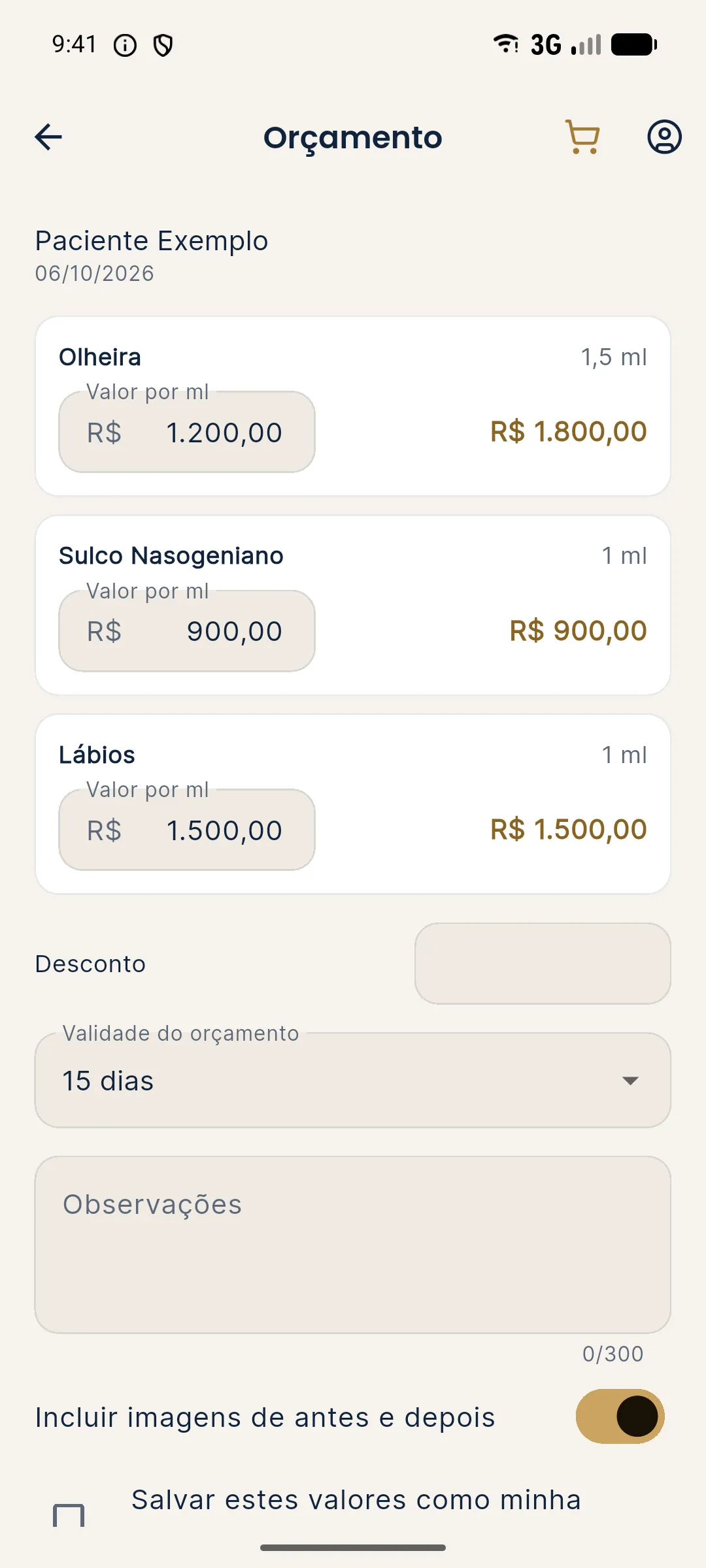
- If you like, enter a Discount in reais.
- Choose the Quote validity: 7, 15, 30 or 60 days.
- Use Notes (up to 300 characters) for payment terms, product used, follow-up or other conditions.
- Leave Include before and after images on to put the photos in the PDF, or turn it off to send only the prices.
- Check Save these values as my price table if you want to reuse the prices on later quotes.
- Tap Create PDF and share and choose the destination app.
What does the PDF look like?
The document comes out with the clinic header (logo, name and contact), the title Treatment plan and quote, the patient's name, the date and the validity date. If images are included, Before and Projection appear side by side, with the caption "Projection: illustrative simulation generated by artificial intelligence." Next comes the table with Area, Volume, Price per ml and Subtotal, the total, a notice that the quote is an estimate that does not replace clinical assessment, and the footer "Made with Harmy".
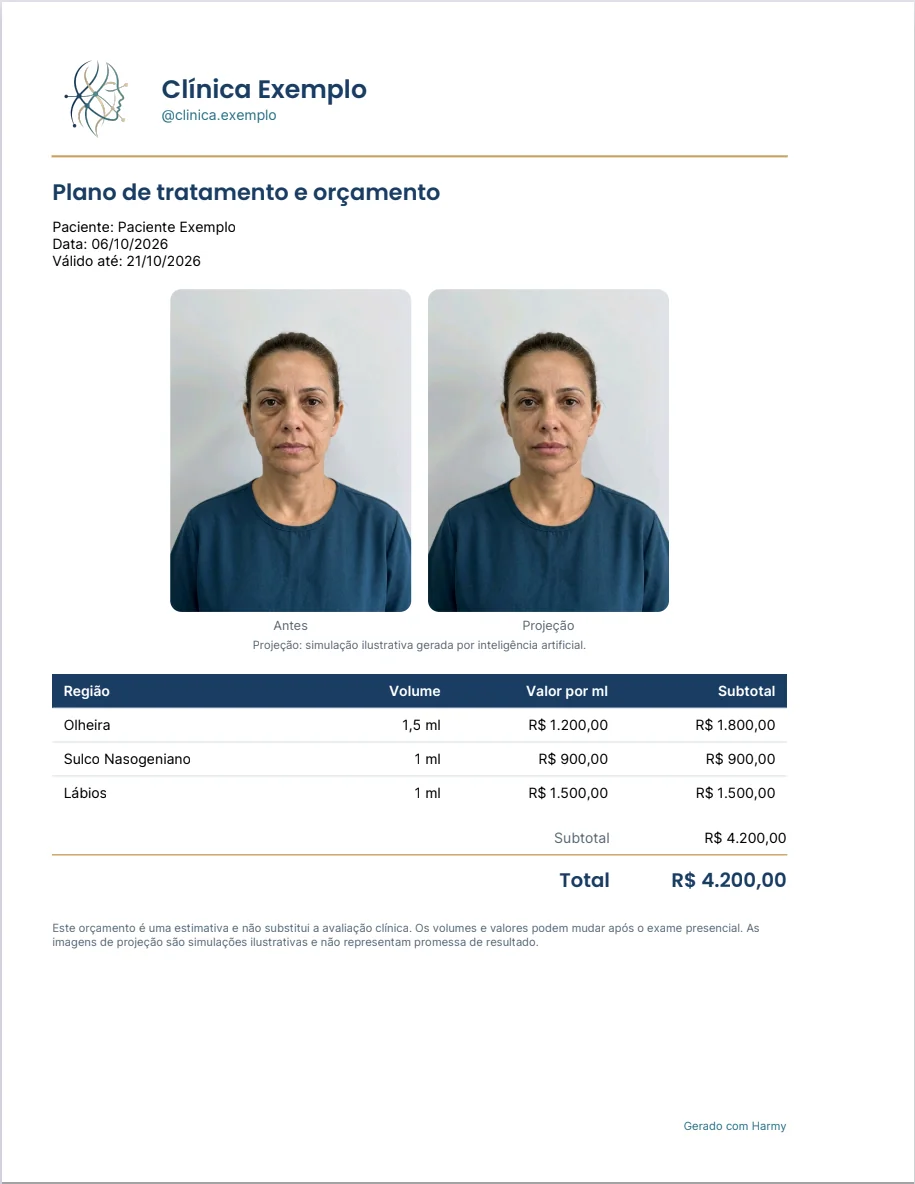
A hypothetical example, the same as in the screenshot: Tear Trough 1.5 ml at R$ 1,200.00 per ml (R$ 1,800.00), Nasolabial Fold 1 ml at R$ 900.00 (R$ 900.00) and Lips 1 ml at R$ 1,500.00 (R$ 1,500.00), for a total of R$ 4,200.00 with no discount.
Where is the price table?
In Account › My clinic, Price table section, you enter the price per ml for each area. The table is used to fill in the quote. Leave blank anything you do not offer. The same clinic name, contact and logo data appear in the PDF header and on the sharing image. See Before / After and sharing.
Tips
- Review the volumes before opening the quote. The ml come from the projection's Plan. If the plan changed during the conversation, make a new projection with the right volumes.
- Write the conditions in Notes, such as installments and what is included in the follow-up. This avoids doubts later.
- Use a short validity when the product price fluctuates and a long one when the patient needs time to decide.
- Explain the estimate notice. The final volume may change after the in-person exam, and the PDF already says so in writing.
- To guide the closing conversation, see how to increase plan acceptance.
Common mistakes and how to fix them
| Situation | What to do |
|---|---|
| The Quote button does not appear | The button appears when the projection has a Plan with areas and volumes. |
| The prices did not come filled in | Save the table in My clinic or check the save option on the quote screen itself. |
| "Could not save the price table" | Check your connection and try again. |
| The PDF came out without a logo | Upload the logo in Account › My clinic and generate the PDF again. |
| The patient does not want a photo in the document | Turn off Include before and after images before generating. |
Next step
After the procedure, go back to the same projection to record the progress. See history and actual result.
Frequently asked questions
How does Harmy calculate the quote value?
For each area in the Plan, the app multiplies the volume in ml by the price per ml you entered. Then it adds up the areas and applies the discount, if any.
Do I have to type the prices every time in the Harmy quote?
No. Check Save these values as my price table, or fill in the table in Account › My clinic, and the values fill in automatically on later quotes.
Does the Harmy PDF quote include the patient's photos?
Only if you want. The Include before and after images option puts the original photo and the projection in the PDF, with the illustrative simulation caption.
What validity can I give the quote in Harmy?
The app offers a validity of 7, 15, 30 or 60 days. The PDF shows the issue date and the final validity date.