
Printed vs. on-screen simulation: which to use in the visit
Quick facts
- Topic
- Format for presenting the simulation
- On screen
- Interactive, with zoom, slider and magnifier
- Printed
- Fixed, can be handed over, easier to turn into a document
- Risk of printed
- Circulating without context and being read as a promise
- Rule
- The simulation notice goes with any format
After generating the simulation, the professional has to decide how to show it. You can turn the phone toward the patient, display it on a tablet or print a sheet. Each format changes the experience of the conversation, the control over the image and the risk it carries. This page compares the two main formats and helps you pick the best one for each situation.
What are the basic differences?
The screen is interactive and ephemeral: the patient looks, drags the slider, zooms in, and the image does not need to leave the office. Paper is fixed and portable: the patient can take it away, show it to family, compare it with other proposals and keep it. That portability is a commercial advantage and an ethical risk. An image without context, outside the office, will be read by the people who see it as a result, a promise or even as "what the clinic does."
This point echoes ethics of result simulation and showing the simulation on a phone or tablet.
How do the formats compare?
| Criterion | On screen | Printed |
|---|---|---|
| Interaction | Slider, zoom and magnifier | None |
| Before and After comparison | Dynamic, by dragging the line | Side by side, fixed |
| Focus on detail | Enlargement on demand | Depends on size and resolution |
| Control over circulation | High | Low once handed over |
| Privacy | Less physical trace | Physical object with the face |
| Simulation notice | Appears on the shared image | Must be printed on the sheet |
| Use with family | The patient has to show the device | Can be taken home and discussed |
| Cost and logistics | None extra | Printing and filing |
| Use in a quote | Can be part of the PDF | Can be attached to the proposal |
The table sums up the decision: if the goal is conversation, the screen is usually more useful; if the goal is to leave a record for the patient to think over, printing helps, as long as it is properly labeled.
When is the screen better?
The screen is the best option when the focus is the conversation to calibrate expectations. The slider lets the patient notice the difference through their own movement, zoom shows the treated area and presentation mode keeps the image full screen, free of distractions. The magnifier enlarges only the treated area, with before and after side by side. All of this happens under your control, and the image can be closed at the end.
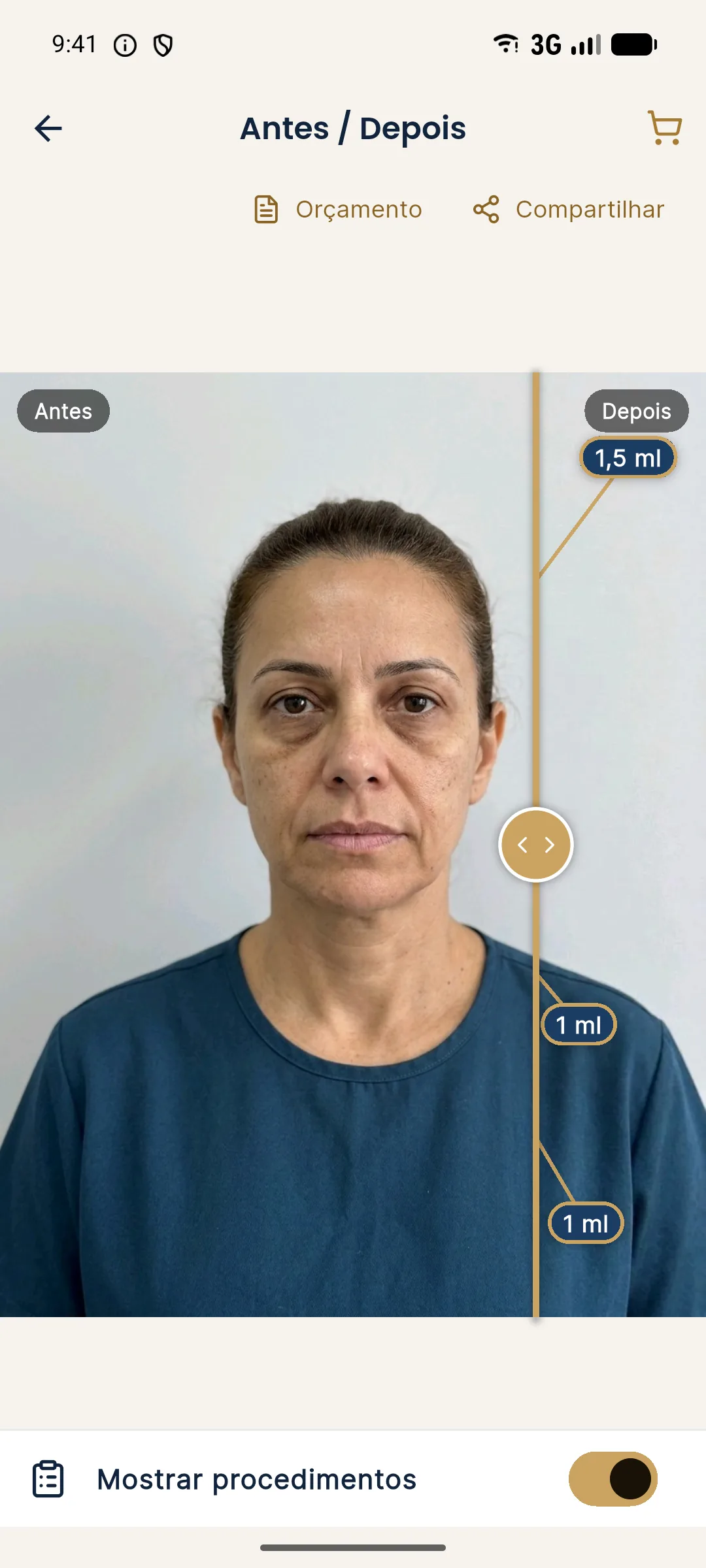
See presenting the treated area with the magnifier and presenting the projection in the consultation.
When does printing make sense?
Printing makes sense when the patient needs to take something home to decide calmly, or when the plan involves other people, such as a spouse or family. It is also useful in long planning consultations, where the professional hands over an organized proposal with a fact sheet, quote and image. In those situations, the printed document works as a formal proposal, and the image plays a secondary role.
The printed notice is indispensable. Without it, the sheet becomes a piece with no context. See notice text for an illustrative simulation and simulation notice when sharing.
What does Harmy already do about format?
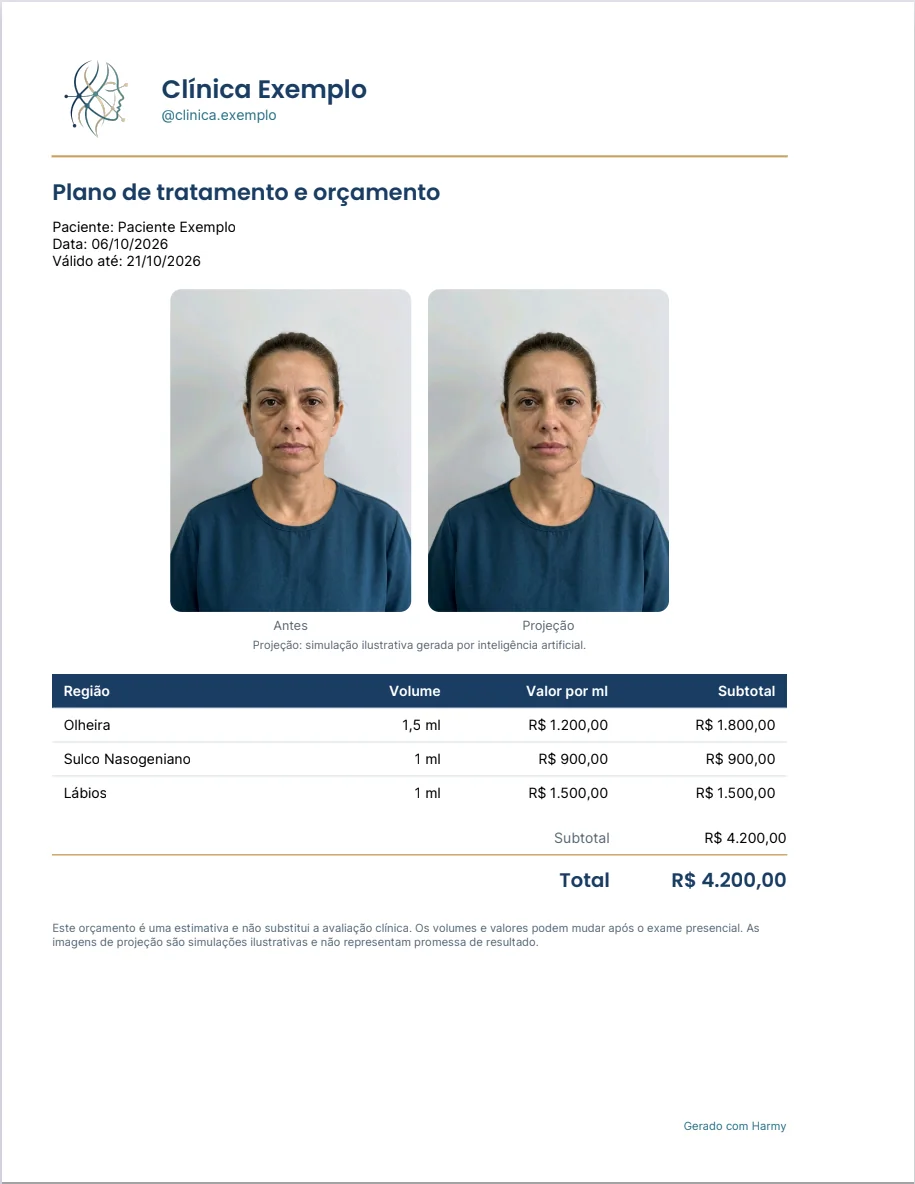
Harmy's share image already comes out with before and after, the clinic header (name, contact and logo, saved in My clinic) and the simulation notice. This applies to digital sending and to printing. The PDF quote can include the images and shows the price per ml, discount, validity and notes, with the clinic's identity. There is also the patient link, which opens on the patient's phone the slider with the clinic's logo and contact, and which can replace printing when the goal is to leave something with the patient.
What specific risks does printing carry?
The first is misuse: the patient posts the image as if it were a result, or shows it to someone else as "my face after." The second is fixed expectation: the printed sheet takes on the weight of a promise, especially if the patient keeps it for months. The third is privacy: a paper with the patient's face is sensitive personal data in physical form, which needs care in disposal and storage.
What about the patient's privacy?
Face photos are sensitive personal data. The on-screen format, shown and then closed, minimizes the trace. Printing creates an object that needs secure storage and disposal. In both cases, consent should cover the use of the image for that purpose. See simulation and informed consent and LGPD (Brazil's data protection law).
How to decide?
Ask yourself what the goal is in that visit. Calibrating expectations and talking: screen. Leaving a proposal for an unhurried decision: patient link, PDF or print with a notice. When in doubt, start with the screen and offer the material afterward, with the notice. That way you keep control of the first contact with the image.
Which format for each type of visit?
At the first consultation, the screen is usually the best choice: the goal is to get to know the patient, calibrate expectations and gauge interest, without creating documents too early. At the decision consultation, when the plan is already defined, the PDF quote with the images and the notice can be handed over, or the patient link sent. At the follow-up visit, the screen takes center stage again, now with the actual result next to the projection. In remote consultations, the patient link avoids sending a loose image through a messaging app.
Think about the setting too. In an office with a lot of light, the phone screen can glare and hurt readability; adjust the brightness or change the position. On a tablet, the image is larger, which helps show detail without needing zoom. For patients with reduced vision, screen magnification is a valuable accessibility feature, and so is printing at a larger size. See showing the simulation on a phone or tablet.
What to do with the sheet after the visit?
If the sheet was handed to the patient, record that. If it stayed in the office, store it according to the service's policy and dispose of it securely when it is no longer needed, for example by shredding it. A sheet left in the printer or in the regular trash exposes the patient's face. This simple care is part of the data protection routine and avoids unnecessary incidents.
Frequently asked questions
Is it better to show the simulation printed or on screen?
It depends on the goal. On screen, the slider and zoom help the conversation. Printed, the image stays fixed and can be taken away, which calls for more care with the notice and privacy.
Can I hand the patient a printed simulation?
You can, as long as it is labeled as an illustrative simulation with the notice visible. Consider the risks of circulation and of being read as a promise, and follow your professional board's rules.
Does Harmy print the simulation?
Harmy generates a shareable image with before and after, the clinic header and the simulation notice, as well as the PDF quote with the option to include images. Printing is at your discretion.
Which format is safer for privacy?
The screen, shown and then closed, leaves less of a trace. Printing creates a physical object with the patient's face, which calls for clear retention rules and consent.
Harmy images are illustrative simulations generated by AI from the patient's photo to support the conversation between practitioner and patient. They are not a promise of results. Indication, technique, product and volume are solely the decision of the licensed practitioner. This content is for information only and does not replace a clinical assessment.