
Presenting the Treated Area with the Magnifier

Quick facts
- Goal
- Show the treated area enlarged, before and after side by side, without exaggerating the effect
- When to use
- Subtle changes in small areas, such as lips, under-eyes and mouth corners
- When to avoid
- To sell volume, or when the patient already expects a bigger effect than planned
- In Harmy
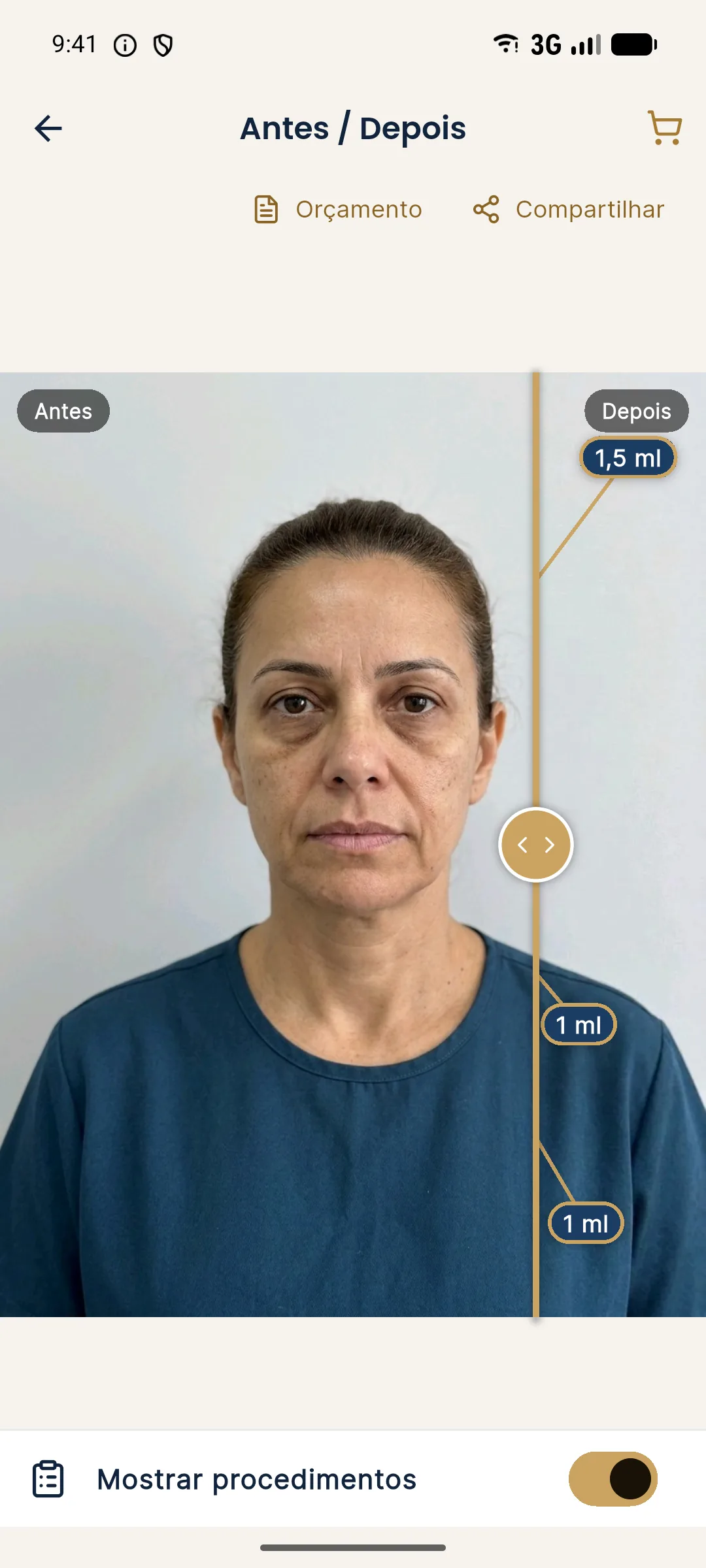
- Presentation mode with a magnifier that enlarges only the treated area
Some projections are subtle by nature. One more millimeter on the lip vermilion, an under-eye shadow that softens, a mouth corner that lifts slightly: on the whole face, the patient may look at the image and say "nothing changed." They are not wrong, they are seeing the scale of the face. The magnifier exists to solve that scale problem, and that is also where it can get in the way.
This page covers when enlarging the treated area helps explain the plan, when the enlargement creates an expectation the procedure will not deliver, and how to guide the conversation. For the general presentation flow, see presenting before and after in the consultation and using the Before/After slider in Harmy.
What is presentation mode with the magnifier?
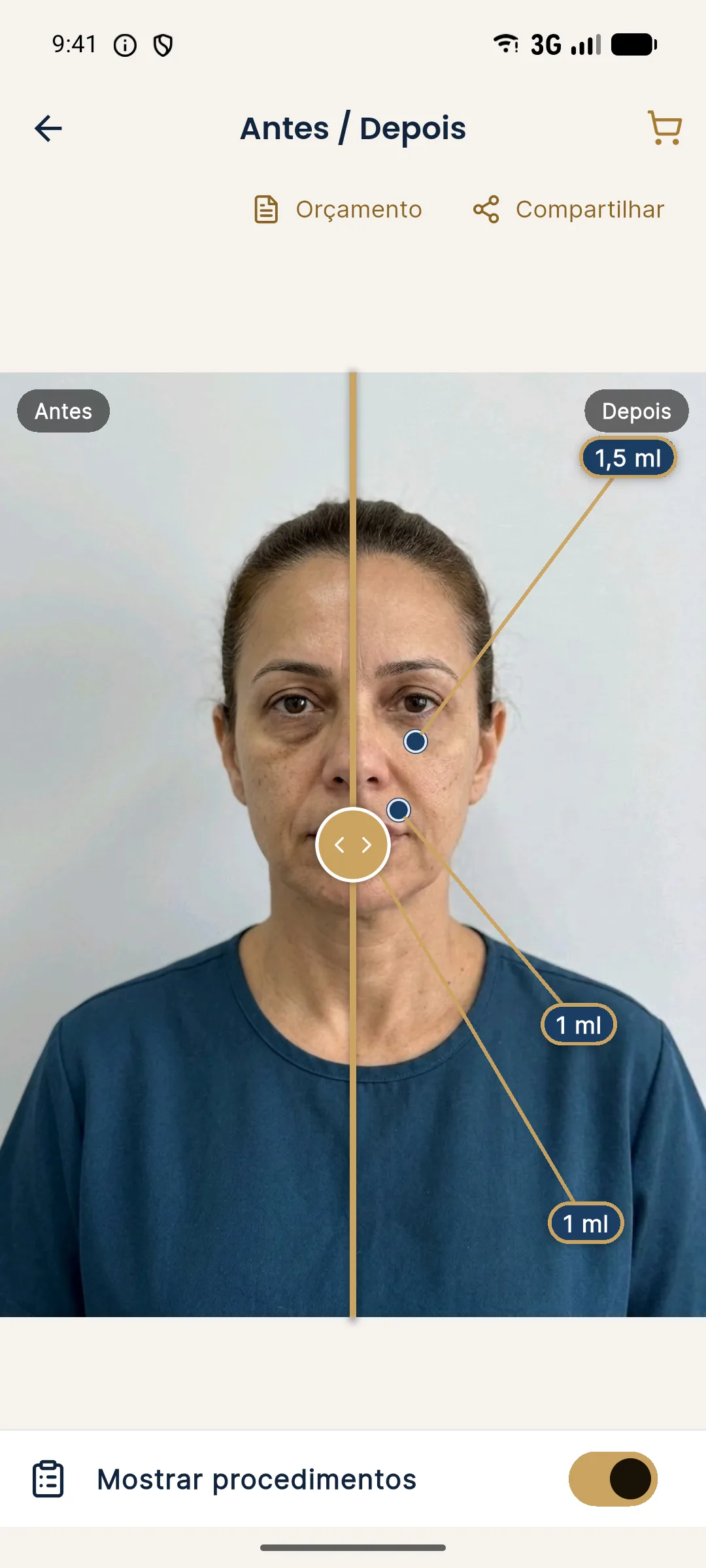
In Harmy, presentation mode opens a full screen with only the slider, no menus, so you can hand the phone to the patient. The magnifier enlarges only the treated area, showing before and after side by side. The patient sees the detail without having to pinch-zoom and lose the reference of the face.
When does the magnifier help?
Enlargement is useful when the difference is real but small relative to the face. Three situations come up again and again:
- Small areas: lips, mouth corners, under-eyes and chin show changes of a few millimeters that the patient's eye does not pick up from a distance.
- Patients who compare with filters: people used to beauty apps expect big changes. The magnifier shows that the projection is honest, and that the difference is subtle by design.
- Explaining asymmetry: enlarging one side and then the other helps explain why the volume will differ on each side, without blaming the patient.
For larger areas, such as the cheekbone or the jawline, the whole face usually tells the story better than the detail.
When does the magnifier get in the way?
Every zoom is a magnifying glass for expectations. Three traps show up:
- Showing only the enlarged detail: the patient sees the magnifier and imagines the effect at the size of the image, not of the face.
- Using the magnifier to close the sale: if the enlarged detail becomes an argument for increasing the volume, the plan stops being clinical.
- Enlarging without context: without going back to the whole face, the patient loses proportion.
How do you run the presentation in five steps?
This rhythm gives the patient a voice before yours and keeps the magnifier as support, not the protagonist.
Which phrases help explain the scale?
Terms like "subtle" and "natural" mean different things to each patient. It helps to anchor them in concrete examples and in what the app shows.
| Situation | Possible phrase | Caution |
|---|---|---|
| Small area with a discreet change | "Enlarged, the difference shows; from a distance it is discreet, and that is the idea." | Do not promise it will look the same |
| Patient who wants more | "That is the ml we planned. We can talk about stages." | Avoid giving in just to close |
| Patient who thinks nothing changed | "Look at the enlarged area. If it still seems like little, we adjust the plan." | Reassess expectations and concern |
| Visible asymmetry | "The sides differ, so the volume may differ too." | Do not promise symmetry |
How does the magnifier relate to the plan and the quote?
The magnifier shows what will be seen, and the quote says what will be charged. When enlarging the area, stay consistent with what is in the plan: the ml in the projection must be the ml in the quote. If you show a projection with 2 ml and quote 1 ml, you create a conflict that will surface at the follow-up. See quote as PDF in Harmy.
What should you record after the presentation?
Note in the patient record what was shown, the expectations the patient voiced and the limitations explained. This protects you and guides the follow-up. If the image is kept in the history, treat it as health data, in line with LGPD (Brazil's General Data Protection Law). See consent and LGPD in photos.
Quick checklist for the magnifier consultation
Quiz: what would you say?
In what order should you present several areas?
When the plan has more than one area, start with the one the patient values most and finish with the one that needs the most explanation. Use the magnifier one area at a time and return to the whole face between them. That way the patient follows the sum of the changes and does not confuse the effect of one area with another. If the magnifier raises doubts about an area, note it and come back to it at the end instead of interrupting the sequence.
Frequently asked questions
What is the magnifier for when presenting the projection?
It enlarges the treated area, with before and after side by side, so the patient can see the subtle difference that the full-screen slider may hide. It is for explaining, not for convincing.
Can the magnifier exaggerate the effect of the projection?
It can. Enlarging too much makes a small difference look big and creates unrealistic expectations. Combine the magnifier with the whole face and with a conversation about limits.
What does Harmy's presentation mode show?
It shows only the Before/After slider in full screen, so you can hand the phone to the patient, and it lets you enlarge the treated area with the magnifier.
Can I post the magnified image on social media?
The projection is an illustrative simulation and must not be advertised as an actual result. Follow the rules of your professional council and of CONAR (Brazil's advertising self-regulation body) on publishing before and after images.
Harmy images are illustrative simulations generated by AI from the patient's photo to support the conversation between practitioner and patient. They are not a promise of results. Indication, technique, product and volume are solely the decision of the licensed practitioner. This content is for information only and does not replace a clinical assessment.