
The simulation does not show movement: how to compensate
Quick facts
- Topic
- The movement limit in 2D simulation
- What is missing
- Facial movement, speech, smile and tissue reaction in motion
- Compensation
- Dynamic exam, questions and a short video with consent
- Risk
- The patient thinking the still face represents the face in action
- Rule
- Say what the image does not show before showing it
The 2D projection is a photograph. It shows the face at a single instant, still, with a neutral expression, and that is exactly what makes it useful for talking about volume and contour. But the face lives in motion, and it is in motion that many concerns show up and many results fall short. This page covers how to make up for the absence of movement in the simulation, with questions, a dynamic exam and an authorized short video.
What does the simulation not show?
Almost everything that depends on facial movement. It does not show how the smile looks after the plan, how volume behaves during speech, how the cheekbone shifts when smiling, how the lips react to a kiss or a yawn, or how the forehead and glabella move. It also does not show how the tissue behaves over the course of the day (late-day swelling, for example), nor the long-term response.
This is a consequence of the product's design: a frontal photo, with the AI changing only what was marked and keeping the original expression. What is gained in control and static realism is lost in dynamics. See limits of 2D simulation and face at rest vs. in motion.
Why does it matter?
Because the patient tends to extrapolate. They see a steady After and imagine the face smiling, talking and living that way. If the reality in motion differs (a lip that projects too much when smiling, a fold that reappears when laughing), disappointment follows. Saying so before showing the image makes the limit part of the conversation, not a surprise.
How to compensate with the exam?
The dynamic exam is the main way to compensate. Have the patient run through a sequence of expressions involving the area of interest and watch the behavior. Describe aloud what you see, so they follow the reasoning. A professional who says "when you smile, this area projects like this" prepares the patient for what the still photo does not show.
This script builds on dynamic facial analysis in expression and photo of the face at rest and in motion.
What to ask the patient?
Well-chosen questions reveal how the face is used in real life and guide the plan. Ask which expressions they make most often, whether they have characteristic gestures, in what situations they see themselves in photos or video (meetings, social media, on stage) and what bothers them when they see themselves in motion. The answers show where the still simulation is more and less reliable.
How to use a short video safely?
Short videos of expressions, recorded with specific consent, help review the face in motion and show the patient what to expect. Video is moving image and sensitive data, so it requires a clear purpose, secure storage and access control. Set a maximum length, a fixed sequence of expressions and a storage location, and explain all of this to the patient before recording. See consent for clinical video and image consent for clinical documentation.
| Option | Advantage | Caution |
|---|---|---|
| Live observation | Immediate and leaves no file | Depends on the professional's memory |
| Authorized short video | Reviewable and comparable | Consent, storage and restricted access |
| Video brought by the patient | Shows real life | Do not archive without need and without consent |
| Photos in key expressions | Simpler to archive | Show only the peak, not the transition |
And how does Harmy fit in?
Harmy fills the role of static simulation and covers volume and contour at rest. For movement, combine it with clinical observation and, when it makes sense, with an authorized video. When presenting the projection, say explicitly: "this image shows the face still." Presentation mode, the magnifier and the slider are excellent tools for the static part, and the conversation about dynamics is up to you.
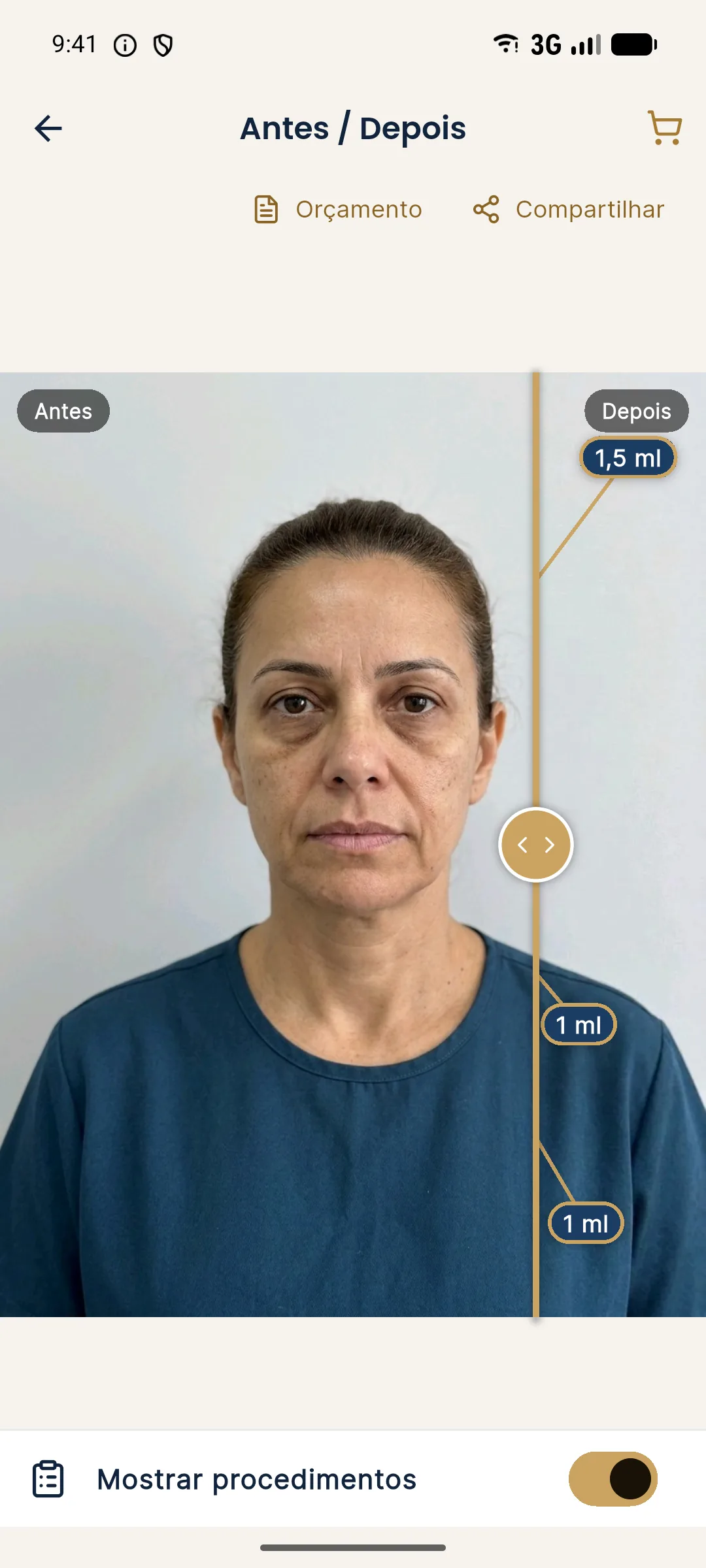
For the balance between image and conversation, see simulation to calibrate expectations, not to sell and expressionless face: how the plan avoids the effect.
Which areas suffer most from this limitation?
Some areas depend heavily on movement to be assessed. The lips and mouth corners change shape during speech and smiling. The cheekbone and the nasolabial fold transform with the smile. The glabella and forehead are assessed essentially in contraction. The tear troughs can change with the expression of the gaze. The chin reacts to speech and pouting. For these areas, the static simulation is only part of the picture.
How to talk to the patient?
Use a fixed sentence before showing the image. Repetition builds a habit and protects the communication. After showing it, invite the patient to make the expressions and look with you at what the photo does not capture.
What to do when the concern is precisely the movement?
Some patients have a main concern that exists only in motion: the wrinkle that appears when laughing, the fold that deepens when smiling, the lip that "disappears" when talking. For them, the still simulation is the least suitable tool for the central decision. In those cases, use the image only to discuss volume at rest, when relevant, and focus the visit on the dynamic exam. Show the patient, in the mirror or on the phone screen in selfie mode, what happens in each expression, and talk about what the plan can and cannot change.
It is also worth arranging a reassessment in motion at the follow-up, with the same sequence of expressions as the first visit. Comparing the two sequences of movements is more informative than any still photo, because it shows whether the face's behavior changed as expected. Record the observations in simple words and, if there is an authorized video, store it with the service's standard naming.
When does the limitation weigh most?
It weighs most for patients who work with their image in motion, such as presenters, teachers, speakers and content creators. For them, the face in action is what matters. It also weighs more in plans that touch highly mobile areas, such as the lips and perioral region. In these scenarios, be even more explicit about what the image does not show and plan short stages, with reassessment in motion. See plan for someone who will appear on camera.
Frequently asked questions
Does the Harmy simulation show the face in motion?
No. The projection is generated from a still frontal photo and the AI does not alter the expression. It does not show how the face behaves when smiling, talking or frowning.
How do I make up for the lack of movement?
By assessing the patient in expression during the visit, asking about the movements they use most and, with specific consent, recording short videos for review.
Do I need consent to record a video of the patient?
Yes. Video is moving image and deserves its own consent, with a clear purpose and secure storage, according to your professional board's rules and the LGPD (Brazil's data protection law).
Why does this matter for the patient's expectations?
Because a good-looking still face can look artificial in motion. If the patient does not know the image does not show that, they may be disappointed by the facial movement later.
Harmy images are illustrative simulations generated by AI from the patient's photo to support the conversation between practitioner and patient. They are not a promise of results. Indication, technique, product and volume are solely the decision of the licensed practitioner. This content is for information only and does not replace a clinical assessment.