
AI simulation in facial harmonization: what changes, what doesn't

Quick facts
- Topic
- How Harmy's AI simulates and where it stops
- What changes
- Only the marked areas, in proportion to the ml
- What does not change
- Skin, makeup, expression, background, hair and lighting
- Input
- One frontal photo
- Limit
- Does not show profile, bone, movement or a guaranteed result
The image the AI returns to the professional looks like a photo, which makes it convincing and, at the same time, dangerous if misread. Understanding precisely what the artificial intelligence does and what it leaves untouched is the basis for using the simulation honestly. This page describes how the Harmy projection behaves, shows what can and cannot be read from the image, and proposes rules of use.
How does the Harmy projection work?
The flow is straightforward. You create the projection for a patient, take or choose a frontal photo, and the app detects the face on the device itself and shows labeled points. You tap the points for the areas to treat, enter the ml for each area (from 0.5 to 5 ml, in steps of 0.5) and the intensity (Subtle, Moderate or Pronounced). When you create the projection, the photo is sent, with the professional's acceptance, to a third-party AI that generates the After image. The result appears in a Before and After slider.
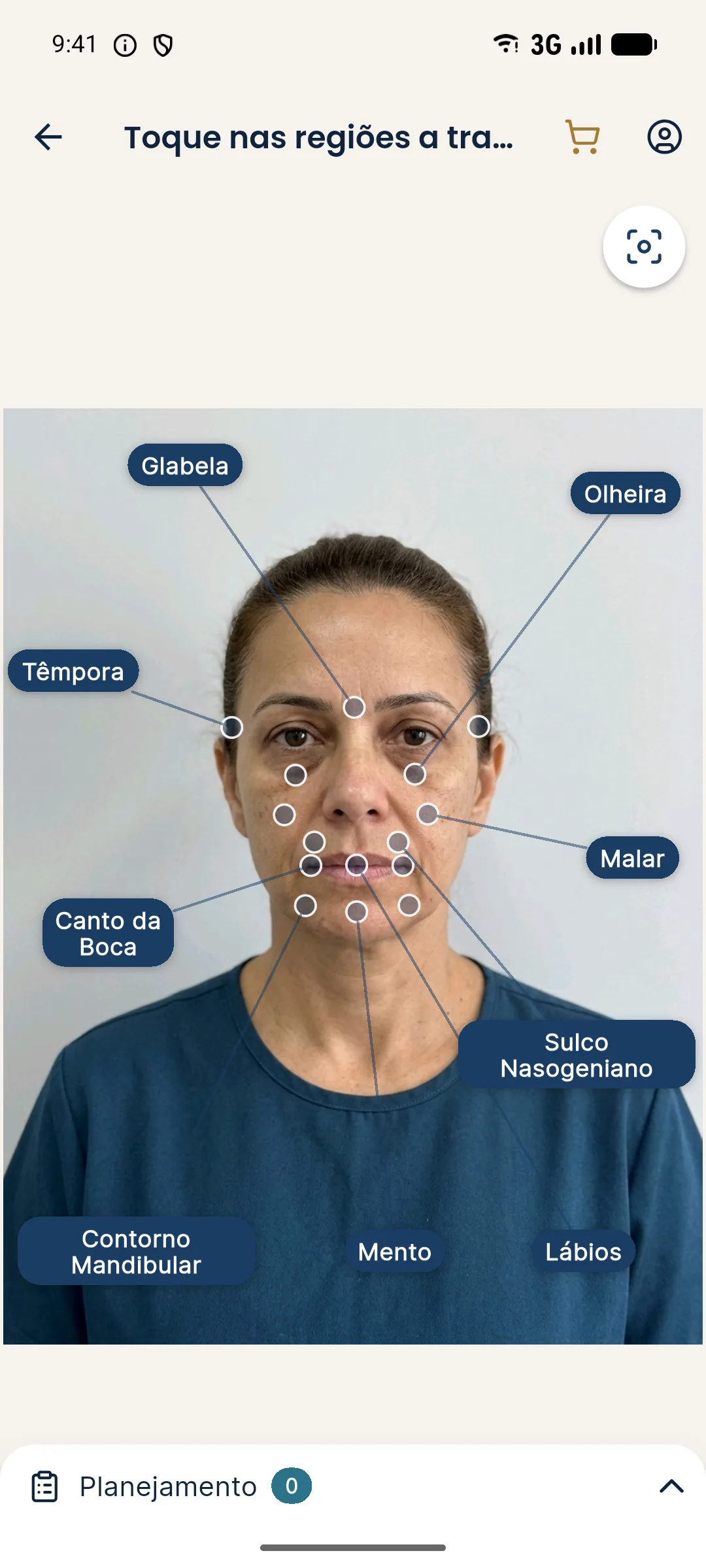
The marking points are Glabella, Temple, Tear Trough, Cheekbone, Nasolabial Fold, Mouth Corner, Lips, Chin and Jawline. The face contours are calculated on the device and are not stored, and each projection costs R$ 3.99, with no monthly fee. For the step-by-step use, see new projection and marking areas and volumes.
What does the AI change?
Only the areas you marked. The volume entered guides the intensity of the change: the more ml, the more noticeable. In bilateral areas (cheekbone, tear trough, temple, nasolabial fold, mouth corner and jawline), the ml is the total and is split between the two sides. The intensity modulates how visible the change is in the area. The typical result is discreet, realistic differences, not dramatic transformations.
What does the AI preserve?
The projection prompt prohibits makeup, skin retouching, and changes to expression, background, hair and lighting. In other words, whatever was not marked must remain as it was in the photo. This is a deliberate product choice: an honest image that does not "beautify" the patient serves planning better than a retouched one. The change the patient sees is the one the plan proposes, not a set of random aesthetic improvements.
| Element | Does the AI alter it? | Note |
|---|---|---|
| Marked areas | Yes, in proportion to the ml and intensity | Subtle, realistic differences |
| Skin (texture and tone) | No | No retouching or makeup |
| Expression | No | Keeps the one in the photo |
| Hair | No | Preserved |
| Background | No | Preserved |
| Lighting | No | Preserved |
| Unmarked areas | No | Should remain as in the photo |
What can the image not say?
Some things lie outside the projection's reach. The photo is frontal, so profile, chin and nose projection, bone and the three-quarter view are not represented. The image is static, so movement and facial expression do not appear. And the image is an AI-generated illustration, so tissue response, durability and technique are not covered. Taken together, this means the simulation illustrates a direction, not a result.
For a deeper look at these limits, see limits of 2D simulation, the simulation does not show movement and why the actual result differs from the simulation.
How does the AI behave with a poor photo?
The quality of the output depends on the quality of the input. A dark photo, a profile shot, glasses, hair covering the face or a filter make detection harder and can produce less faithful images. That is why the first step is always the standardized frontal photo: face straight on, good diffuse light, neutral expression and nothing covering it. See standardized frontal photo and hair, earrings and glasses in the assessment photo.
What privacy precautions apply?
The patient's photo is sensitive personal data. In Harmy, sending it to a third-party AI happens with the professional's acceptance in the app, and the professional must inform the patient and record consent. Photos and simulated images should not be exposed on social media, and the site's public routes never return the patient's name. The usage policy should be clear in the image consent form. See simulation and informed consent, LGPD (Brazil's data protection law) and recording the simulation in the patient record.
How to explain it to the patient in plain language?
Describe the process as "an illustration created by a computer from your photo, which changes only the areas we talked about." Stress that it is not a retouch, that it does not predict the exact result and that the plan adjusts to how your face responds. Ask them to say what they notice before you interpret it.
What are the best practices for use?
Use the projection to talk and plan, not to promise. Always show the simulation notice, which goes with the shared image. Prefer Subtle and Moderate intensities to present what is reasonable. Compare with the actual result when one exists, using "Add actual result" and the Projection vs Actual comparison, and learn from the difference. And note in the patient record that the image was presented as an illustration.
Frequently asked questions
What does Harmy's AI alter in the photo?
Only the marked areas, in proportion to the ml and intensity entered. The more ml, the more noticeable the change. The rest of the face stays as in the original photo.
Does the AI retouch the skin or change the expression?
No. The projection does no makeup or skin retouching and does not change expression, background, hair or lighting. This avoids beautification and keeps the image honest.
Is the patient's photo sent anywhere?
Yes. The photo is sent to a third-party AI to generate the image, with the professional's acceptance in the app. The face contours are calculated on the device and are not stored.
Does the simulated image guarantee the result?
No. It is an illustrative simulation, which may differ from the actual result because of tissue response, anatomy and technique. It must not be presented as a promise.
Harmy images are illustrative simulations generated by AI from the patient's photo to support the conversation between practitioner and patient. They are not a promise of results. Indication, technique, product and volume are solely the decision of the licensed practitioner. This content is for information only and does not replace a clinical assessment.