
Facial Harmonization Simulation: What the App Shows
A facial harmonization simulation is an image generated from a patient's photo to illustrate how the planned areas might look after the procedure. It serves to support the conversation between professional and patient at the consultation: showing the goal, aligning expectations and discussing volumes. It does not show the actual result and is not a promise: anatomy, product, technique and each body's response decide what really happens.
This page explains how this type of simulation works, what it shows and what it does not, using Harmy as an example, an app made for orofacial harmonization (HOF) professionals to use at the consultation. If you are a patient and came here looking for an app to "try out" harmonization, the final section is for you.
How does the simulation work in Harmy?
The flow starts from a single front-facing photo:
- In New projection, the professional enters the patient's name and takes the front-facing photo or picks one from the gallery.
- The app detects the face on the device itself and shows labeled points: Glabella, Temple, Tear Trough, Cheekbone, Nasolabial Fold, Mouth Corner, Lips, Chin and Jawline.
- The professional taps the areas to treat and, in Plan, sets the ml for each one, in 0.5 ml steps.
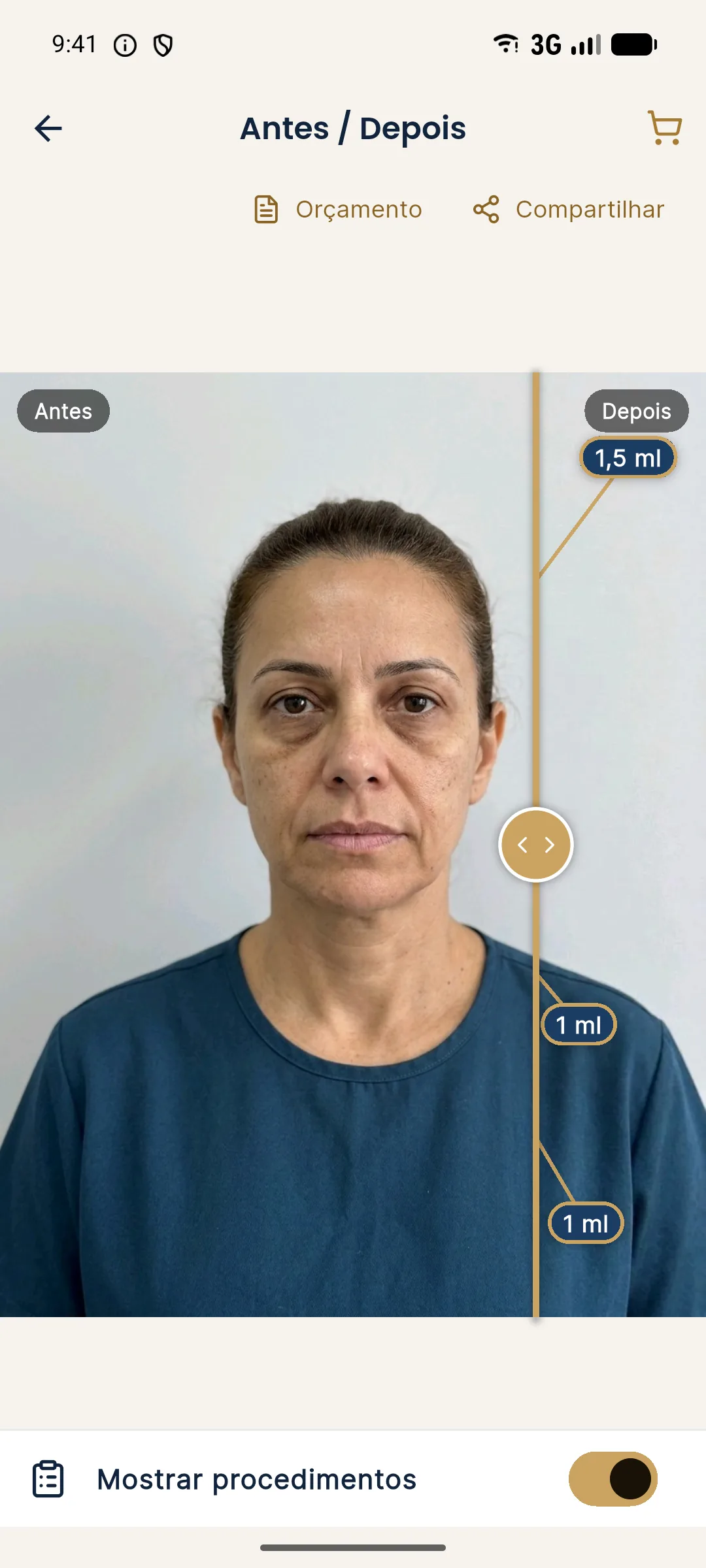
- When the projection is created, the app shows Before and After in a slider: dragging the gold line compares the two images, and two fingers zoom.
- "Show procedures" displays the ml of each area over the After image.
The full walkthrough is in new projection and in marking areas and volumes.
What does the simulation show and not show?
| Harmy's simulation | Shows | Does not show |
|---|---|---|
| Areas | Only the areas marked by the professional | Changes in areas that were not planned |
| Volume | Change proportional to the ml: the more ml, the more noticeable | The exact volume the tissue will take |
| Skin | The skin as it appears in the photo | Retouching, smoothing or makeup |
| Expression, hair, background, light | Same as the original photo | Any change to those elements |
| Time | An illustrative image of the goal | Swelling, bruising, how long the effect lasts or future aging |
| Angle | Front view, from one photo | Profile, three-quarter view or 3D model |
In a bilateral area, such as the cheekbone or tear trough, the ml entered is the total, split between both sides. By rule of the generation itself, the image gets no makeup, skin retouching, or changes to expression, background, hair or lighting. That is why the changes tend to be subtle and realistic, which makes the projection a more honest conversation tool.
Why use simulation at the consultation?
Because harmonization is, in large part, a conversation about expectations. Patients often arrive with social media references, vague requests ("I want a more defined face") or fear of looking artificial. An image of their own face, with changes proportional to the planned volume, helps to:
- translate ml into something visual, without abstract numbers;
- show that a small volume can be enough;
- discuss priorities when the plan has several areas;
- record what was discussed.
How to present the image without it sounding like a sales pitch is in presenting before and after at the consultation.
And the patient's photo: what happens to it?
In Harmy, the face contours are calculated on the device itself and are not stored. To generate the image, the photo is sent to a third-party AI, with the professional's consent in the app. A face photo is personal data, and the patient needs to know how it will be used: the topic is in consent and LGPD (Brazil's data protection law) for photos.
Publishing the simulation is a separate matter. A projection cannot be published as if it were the result of a procedure. What the rules in Brazil allow is in what can be advertised under CFO and CONAR rules.
How much does it cost and who uses it?
Harmy is an app for Android and iPhone, used by the professional. Each projection costs R$ 3.99, with no monthly fee, and a new account gets 1 welcome projection. Details in credits and top-up. To judge whether it pays for itself in your routine, the calculator of projections that pay for the app does the math with your own numbers.
I am a patient: can I try harmonization on myself?
The most useful route is to ask the professional for the simulation, at the assessment consultation. They examine the face in person, understand what is indicated and set the areas and volumes. Simulating on your own, without an assessment, tends to show a plan that may not even make sense for your anatomy, and can also reinforce an expectation that is hard to meet.
Be wary of images that smooth the skin, change the light or slim the whole face: that looks more like a social media filter than a clinical simulation. A good simulation changes little, changes only what was planned and always comes with the phrase "illustrative simulation, not a promise of results".
Frequently asked questions
Is there an app to simulate facial harmonization?
Simulation apps exist, and some are built for the professional to use in the consultation, like Harmy. From a front-facing photo, they generate an illustrative image of the planned areas, which is not a promise of results.
Does a facial harmonization simulation show the actual result?
No. It is an illustrative simulation to support the conversation about the plan. The actual result depends on anatomy, product, technique and each person's response.
Can I try facial harmonization on myself before having it done?
The most useful route is to ask the professional for the simulation at the assessment consultation, because they define the areas and volumes that make sense for your face. Simulating on your own, without an assessment, tends to show a plan that may not even be indicated.
What is the difference between a harmonization simulation and a social media filter?
Filters usually smooth the skin and change light and features freely. An honest clinical simulation changes only the planned areas, in proportion to the volume, without retouching the skin or changing the expression.
Harmy images are illustrative simulations generated by AI from the patient's photo to support the conversation between practitioner and patient. They are not a promise of results. Indication, technique, product and volume are solely the decision of the licensed practitioner. This content is for information only and does not replace a clinical assessment.