
Saving Simulation Versions at Each Follow-Up
Quick facts
- Goal
- Save each simulation with its date, plan and reason, to compare and justify changes
- Organizing unit
- Patient, follow-up date, plan version
- Benefit
- Shows the evolution of the plan and protects against confusion about what was agreed
- Caution
- Patient images are sensitive data: store them securely and with consent
The HOF plan is not a closed document. At each follow-up, the patient responds in their own way, something new comes up, an area is postponed, the volume changes. When the simulation follows the plan, each adjustment generates a new image, and without organization they pile up in unnamed folders, in the camera roll, in message threads. In the end, nobody knows which image represented which plan.
Saving simulation versions by follow-up is a simple habit with three payoffs: it brings clarity to the history, it protects you when there is doubt about what was agreed, and it helps the patient see the evolution of their own face. This page shows how to organize it without creating bureaucracy.
Why version the simulation?
Versioning means saving each state of the plan with its date. For the simulation, the reasons are practical.
- The plan changes. A second session rarely repeats the first. The old version shows where you started.
- The patient forgets. Months later, they remember an image that may not even have been the final one. With versions, you can show which was which.
- The decision is recorded. When a volume is reduced, the new version with the reason note is the proof of the clinical reasoning.
- Comparison becomes possible. Without versions, there is no way to line up plan, simulation and actual result.
- The conversation about expectations improves. Seeing the image of the old plan and the current one helps explain the path.
The subject crosses with versioning the plan document itself, in treatment plan versions, and with the timeline in the HOF patient timeline.
How to organize by date and by plan?
The simplest structure uses three levels: patient, follow-up date and version. Inside each version go the simulation and a short note.
| Level | Example | What it contains |
|---|---|---|
| Patient | Patient name | All sessions |
| Date | 2026-10-29 | The follow-up or consultation |
| Version | v1, v2, v3 | The simulation and the plan note |
The note is what makes the most difference. In one or two lines, record:
- which areas and volumes the version represented;
- what changed compared with the previous one;
- the reason for the change;
- whether the image was shown or sent to the patient.
What changes at each follow-up?
Between the first visit and the first follow-up there are usually at least three reasons for a new version. The first is the response to treatment: the result turned out more subtle or more evident than predicted. The second is a change in the patient's priorities, who now wants another area. The third is a new finding at reassessment, such as an asymmetry or a change in weight.
The guide to what to look at in each follow-up is in what to reassess at the plan follow-up, and reassessment at time milestones is in reassessment at 3, 6 and 12 months.
What must every version include?
Each version needs at least five elements to be useful.
The starting photo is decisive: if the base photo changed between versions, the comparison loses meaning. When possible, use the same standardized before photo, and only change it if there is a clinical reason (for example, the patient lost a lot of weight). The alignment issue is covered in alignment errors when comparing photos.
Where to store them securely?
Face images are personal data and, under the LGPD (Brazil's data protection law), deserve reinforced protection. Keeping them on a personal phone or in open message threads is an unnecessary risk. Good practices:
- store them in the patient record or in a clinic system with password access;
- avoid leaving images in the camera roll of a personal device;
- limit who can see them, according to each team member's role;
- have the patient's written consent, including storage of the simulations;
- follow the retention periods for the patient record according to your professional council's rules.
How to design the consent is covered in consent and LGPD for photos, and recording the simulation in recording the simulation in the patient record.
How does Harmy help save versions?
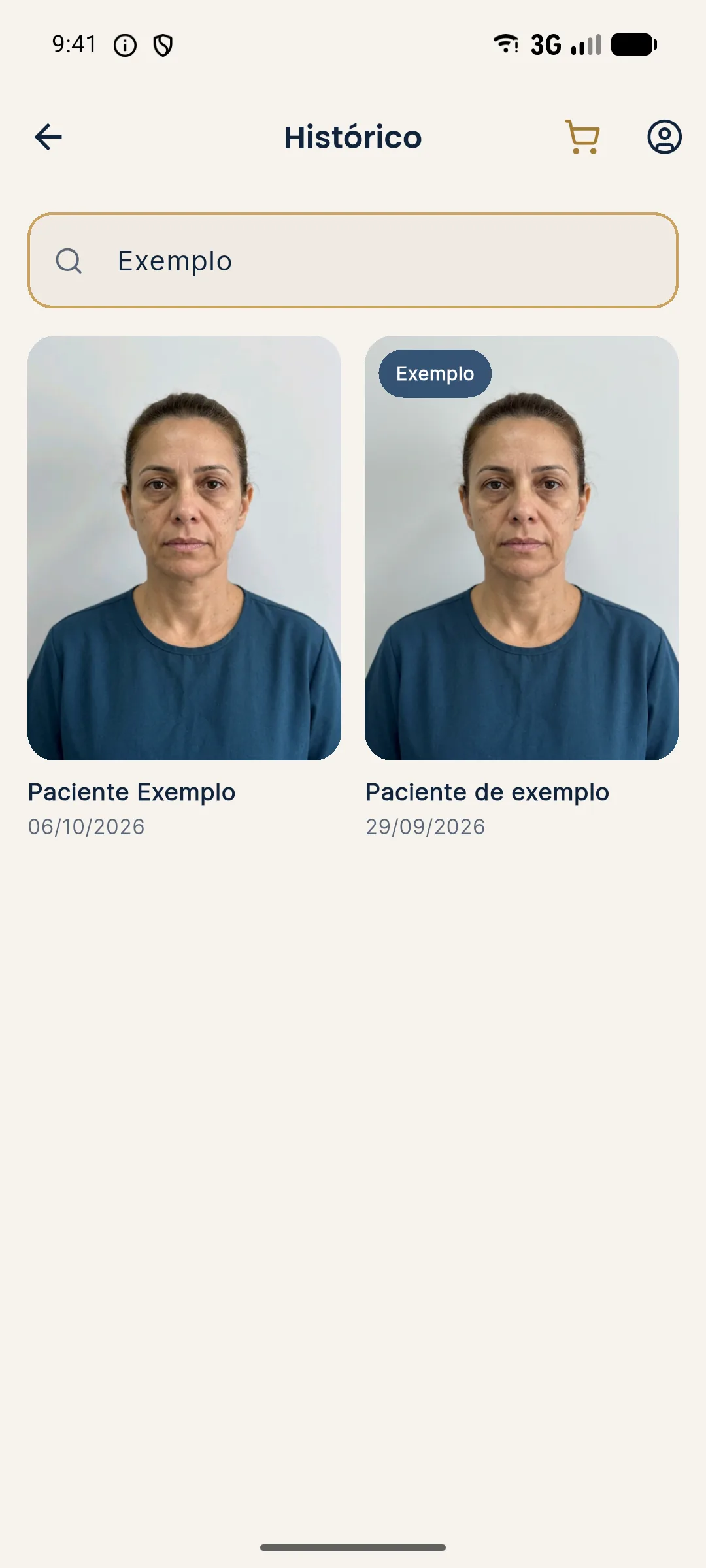
How history is organized in the app is covered in history by patient in Harmy, and the logic of grouping by patient in organizing projections by patient. Each projection generated costs R$ 3.99, with no monthly fee, and the rule of thumb is to generate a new version when the plan has really changed, not for every small variation.
How to use the versions in the conversation with the patient?
Versions help guide the conversation about evolution. Instead of saying "remember that the plan was different?", you show v1 and v2 side by side and explain what changed. The patient sees that the plan follows their response, and the change stops looking like improvisation.
Care points in the conversation:
- remember that the simulation is illustrative, both the old one and the new one;
- avoid comparing the old simulation with the actual result as if it were an accuracy test;
- focus on direction and proportion, not millimeters;
- if the old simulation showed more than what was done, explain the reason for the difference.
The difference between simulation and actual result is explained in why the actual result differs from the simulation.
Quiz: simulation versions
Summary
- Versioning the simulation by follow-up brings clarity, protection and a basis for comparison.
- Organize by patient, date and version, with a note on the reason for the change.
- Keep the same base photo across versions, unless there is a recorded clinical reason.
- Store securely, with consent and in line with the LGPD.
- In Harmy, History organizes projections by patient and date.
Frequently asked questions
Why save simulation versions at each follow-up?
Because the plan changes with the patient's response. Each version shows what was proposed at that moment and why, avoiding disputes about what was agreed.
How should I name the versions?
Use patient, date and version, for example 'name, 2026-10-29, v2'. Add a short note with the reason for the change, such as 'chin reduced after reassessment'.
Should I delete old versions?
Not as a routine. They are part of the history. Deletion should follow the patient's request and the law, and the retention period for the patient record follows your professional council's rules.
Can I compare the old simulation with the current result?
Yes, to talk about what changed, making clear that the simulation is illustrative. Always compare photos with the same framing and expression.
Harmy images are illustrative simulations generated by AI from the patient's photo to support the conversation between practitioner and patient. They are not a promise of results. Indication, technique, product and volume are solely the decision of the licensed practitioner. This content is for information only and does not replace a clinical assessment.