
Simulation with more than one scenario in the same visit

Quick facts
- Topic
- Comparing volume scenarios in the same visit
- Ideal number
- Two or, at most, three options
- Variables
- Areas included, ml and intensity
- Cost in the app
- Each projection generated uses one projection (R$ 3.99)
- Caution
- More options can create indecision instead of clarity
Many patients decide better when they compare. Showing a single image creates a sense of a closed proposal, while two or three options open up a conversation about what really matters. Building scenarios in the same visit is a useful planning strategy, as long as it is done with care. This page shows how to build and present the scenarios and how to avoid the mistakes that turn comparison into confusion.
Why work with more than one scenario?
There are three main gains. The first is autonomy: the patient takes part in the decision and feels ownership of the plan. The second is calibration: by comparing options, they understand the effect of each area and each volume, and tend to choose more realistically. The third is safety: the conservative scenario is always available as a starting point, which lowers the pressure for bigger results.
This logic is a relative of simulation to calibrate expectations, not to sell and of conservative plan vs. complete plan.
How many scenarios to create?
Two or three. With one, there is nothing to compare; with four or more, the patient gets lost. A common design is: a conservative scenario (few areas, Subtle intensity), an intermediate one (main areas, Moderate intensity) and, optionally, a more complete one. Each should have a logic the patient can sum up in one sentence.
| Scenario | Logic | When it makes sense |
|---|---|---|
| A, conservative | One or two areas, Subtle intensity | First time, apprehension, limited budget |
| B, intermediate | Main areas of the concern, Moderate intensity | Patient with a clear goal |
| C, complete | Set of areas in stages, Moderate intensity | Long-term plan, presented as an overview |
The complete scenario should be presented as a horizon, not as an immediate proposal. See risks of a facial harmonization plan that runs too long and minimum viable plan in facial harmonization.
How to build the scenarios in Harmy?
Each scenario is one projection. You use the same frontal photo, mark the areas for the scenario, set the ml and choose the intensity. To compare clearly, change one variable at a time: for example, the same area at Subtle and then Moderate intensity, or the same set with different ml. If you change everything at once, the patient cannot tell what caused the difference.
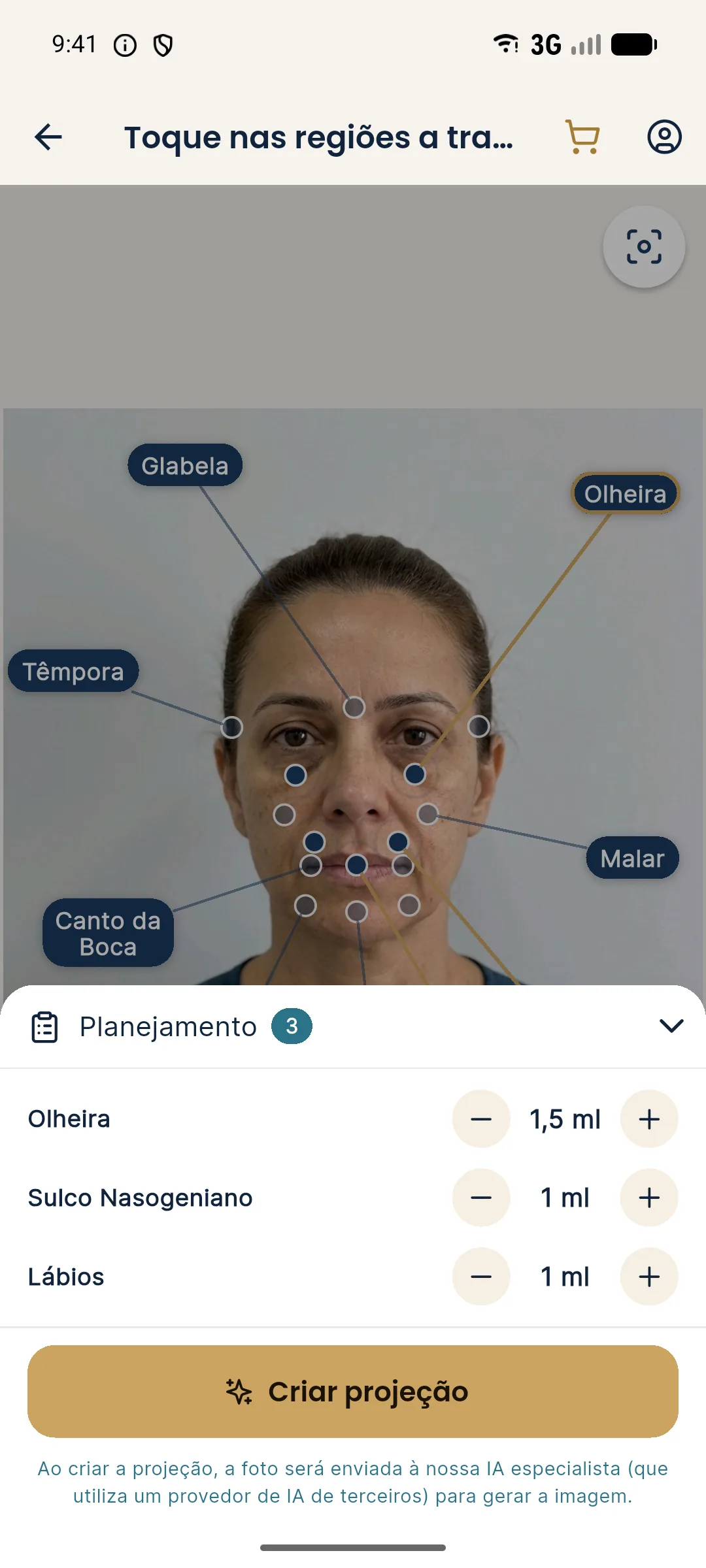
The shortcuts have set values: "First time" uses lips 1 ml at Moderate and tear trough 1 ml at Subtle; "Maintenance" uses lips 0.5 ml at Subtle, nasolabial fold 1 ml at Subtle and cheekbone 1 ml at Subtle; "Full harmonization" combines cheekbone 2 ml, jawline 2 ml, chin 1.5 ml, lips 1 ml and nasolabial fold 1 ml at Moderate, with tear trough 1 ml at Subtle. The values are starting points for the conversation, not a recommendation.
How to present the scenarios?
Order matters. Start with the conservative scenario, to anchor the conversation in what is safest. Then show the intermediate one and, last, the complete one if there is one. Use the app's presentation mode, which shows the slider full screen, and the magnifier to enlarge the treated area. Always ask what the patient notices as different between the scenarios before saying what you think.
See how to use the magnifier in presenting the treated area with the magnifier and how to choose the device in showing the simulation on a phone or tablet.
What pitfalls to avoid?
The first is indecision: the more options, the harder it is to choose. The second is anchoring on the most pronounced: the patient may want the most visible scenario without weighing risks and cost. The third is unfair comparison, when scenarios differ in many variables. The fourth is use for selling, where the largest scenario is shown to make the intermediate one look small. That practice violates the consultative spirit of using the image.
How to record the choice?
Note in the patient record which scenarios were shown, which one was chosen and why. Keep the images labeled with the scenario and the date. If the patient comes back for another decision, the history is there. Also keep the note that the images are illustrative. See keeping simulation versions per follow-up and recording the simulation in the patient record.
What about the quote?
Each scenario corresponds to a set of areas and ml, and therefore to a price. In Harmy, the PDF quote uses the price per ml for each area, saved in My clinic, with informational installments, validity and a notice. Offer the quote for the chosen scenario, not for all three at once, unless the patient asks. See linking the plan and the quote in facial harmonization.
What if the patient wants to combine parts of two scenarios?
It is a common request: "I wanted the lips from scenario B with the chin from A." It shows the patient is taking ownership of the plan, and that is positive. Assess whether the combination makes sense clinically. If it does, create a new projection with the combination instead of trying to describe it in words, because the image avoids misunderstandings about what was combined. If the combination is not advisable, explain why based on proportion, risk or total volume, and offer a close alternative.
It is also worth planning for the opposite case: the patient who liked every scenario and cannot decide. In that case, suggest taking the images home, with the simulation notice, and schedule a second conversation. Deciding calmly is part of safety, and a patient who chooses without hurry tends to end up more satisfied. If the image is shared, Harmy generates it with before and after, the clinic header and the simulation notice, which keeps the illustration from circulating without context.
How to keep scenarios from becoming a promise?
Always use the same terms: "scenario," "option," "illustration." Avoid "result A" or "result B," which suggest a prediction. Make it clear, aloud and in writing, that the actual result depends on how the tissue responds and may differ from the image. See why the actual result differs from the simulation and notice text for an illustrative simulation.
Frequently asked questions
Is it worth showing several simulations to the same patient?
Two or three are usually enough. Too many options confuse and can lead to impulsive decisions. Ideally each scenario has a clear logic and differs from the others.
Does each scenario generate a new projection in the app?
Yes. Each projection created in Harmy uses one projection, which costs R$ 3.99, with no monthly fee. Plan the scenarios before generating so you do not waste any.
What sets the scenarios apart?
Usually the set of areas, the ml for each one and the intensity (Subtle, Moderate or Pronounced). Changing one variable at a time makes the comparison easier.
Can the patient choose the most pronounced scenario?
They may prefer it, but the final decision is clinical. If the chosen scenario is not safe or advisable, the professional should explain why and propose an alternative.
Harmy images are illustrative simulations generated by AI from the patient's photo to support the conversation between practitioner and patient. They are not a promise of results. Indication, technique, product and volume are solely the decision of the licensed practitioner. This content is for information only and does not replace a clinical assessment.