
When Simulation Helps in a Facial Harmonization Plan

Quick facts
- When it helps
- When it turns a plan into an image, compares scenarios, aligns expectations and records the patient's decision
- When it does not help
- When it replaces clinical assessment or promises a result
- Condition
- Being presented as an illustration, at a sustainable intensity and with the patient informed of the limits
- Complement
- See also the opposite of this page: when simulation gets in the way
Simulation has become part of the facial harmonization consultation repertoire, but it is not always the right tool. It is excellent in some situations and useless, or even harmful, in others. Knowing the difference is what separates a communication resource from a sales prop.
This page gathers the uses in which simulation truly adds value to the plan, with a practical look at each. The opposite, the uses that cause harm, is in when simulation gets in the way of the plan.
What makes a simulation useful?
A simulation is useful when it improves a decision that, without it, would be less informed. This requires three conditions: the image must be faithful to the plan (same ml, same intensity), it must be presented as an illustrative simulation and it must be sustainable, meaning something you can deliver. When any of these fails, the risk outweighs the benefit. The ethical discussion is in ethics of result simulation.
In which situations does simulation help most?
When the patient cannot picture the plan
Terms such as "volumize the cheekbone" or "define the jawline" mean little to a layperson. The image turns the plan into something concrete: the patient sees their own face with the proposed change and understands what it is about. This reduces misunderstandings, especially about how much changes and where.
When scenarios need to be compared
Showing the conservative and the complete scenario side by side helps the patient choose based on what they see and not on adjectives. This is simulation's strongest use. See simulation with more than one scenario and comparing Subtle, Moderate and Pronounced intensities.
When expectations need calibrating
A subtle image, shown with the right explanation, adjusts the expectation of a patient who imagines a dramatic change. It moves the conversation from vague wishes to what is possible, as in simulation to calibrate expectations and in why simulation should be subtle.
When the plan has several stages
Showing the plan in phases, with one image per stage, helps explain why the full result takes months. The logic of splitting is in when to split the volume into sessions and in 12-month facial harmonization plan.
When the order of areas has to be decided
Projecting one area at a time makes it possible to see the impact of each and justify the priority. This is the use that underpins prioritizing by visual impact in the plan.
When you need to document what was agreed
The chosen image, stored with a date, becomes a record of what was shown and accepted. This protects the clinic and the patient in case of future doubt. The storing workflow is in recording the simulation in the patient record and in keeping simulation versions per follow-up.
What is the difference between a helpful use and one that becomes marketing?
The line is thin. The same resource, used to clarify, is a clinical tool. Used to push a decision, it is marketing in disguise. A few signs help tell them apart:
| Helpful use | Use that becomes marketing |
|---|---|
| Shows the agreed plan, at the agreed volume | Shows a stronger version than the plan |
| Presented as an illustration, with caveats | Presented as a prediction or "result" |
| Shows the conservative scenario first | Shows the most impressive one first |
| Lets the patient decide without hurry | Used with a short deadline to decide |
| Stored as a record | Published as if it were a real result |
Sharing the image outside the office calls for special care. Never post the projection as if it were a result, and follow the rules described in what you may advertise in Brazil: CFO and CONAR and in notice text for illustrative simulation.
How does Harmy fit into these uses?
The app's workflow was designed for these uses. You create the projection from a frontal photo, mark the areas, set ml and intensity and see the result in a Before/After slider. Presentation mode leaves only the slider in full screen, so you can turn the phone to the patient, and the magnifier enlarges the treated area, with before and after side by side.
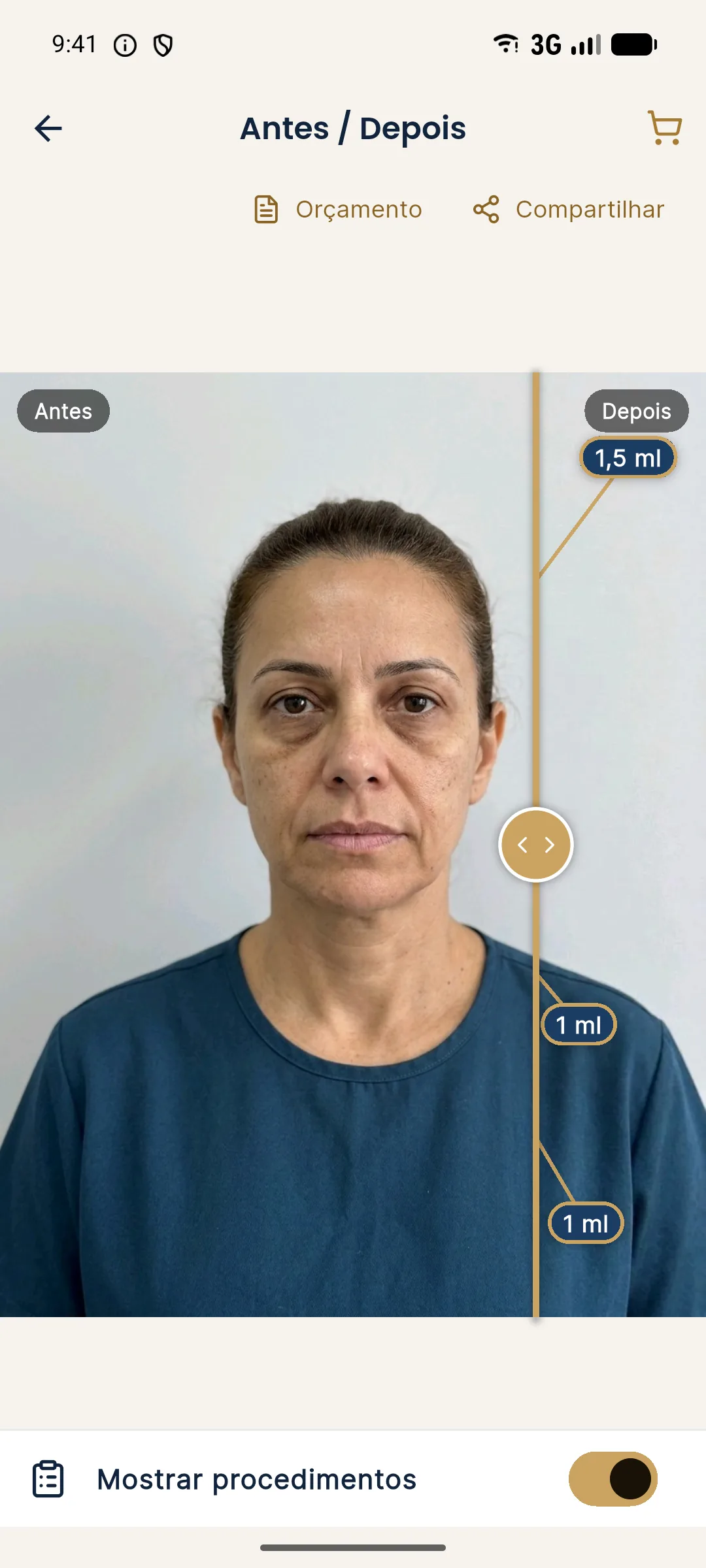
The patient link is an option to send the simulation without a loose image: it opens the slider on their phone with the clinic's logo and contact. How to show it in the consultation is in showing the simulation on a phone or tablet.
How to run the presentation so that it truly helps?
The image does not speak for itself. What makes it help is the frame you give it. A simple sequence:
The same sequence works for the follow-up consultation, when the original image is compared with the actual result. The app stores the aligned "after" photo and lets you compare Projection, Actual result and Projection vs Actual, as in comparing projection and actual result.
In which specific contexts does simulation help most?
- Visual patients, who understand better through an image than an explanation.
- Anxious patients or those afraid of looking artificial, who are reassured by seeing a restrained change, as in plan for an anxious patient or one afraid of needles.
- First time with facial harmonization, when expectations need a realistic anchor, per plan for a first time with facial harmonization.
- Patient with a companion who has opinions, where the image anchors the conversation in a concrete face.
- Multi-area cases, where seeing the whole helps avoid excess.
What minimum precautions should you take so that it helps?
The form and the consent continue in simulation and informed consent form.
Frequently asked questions
In which situations does simulation really help?
It helps turn the plan into an image, compare scenarios, align expectations, decide the order of areas and record what was shown and what the patient chose.
Does simulation increase acceptance of the plan?
It can make understanding and deciding easier, but that should not be its purpose. The goal is an informed decision, and an honest image contributes to it.
Do I need to show the simulation to every patient?
No. There are situations where it adds little or gets in the way. The decision is the professional's, depending on the case and the patient's expectation.
What should I do with the image after the consultation?
Store it with a date alongside the plan, to compare with the result and recall what was agreed. Sharing it with the patient requires the notice that it is an illustrative simulation.
Harmy images are illustrative simulations generated by AI from the patient's photo to support the conversation between practitioner and patient. They are not a promise of results. Indication, technique, product and volume are solely the decision of the licensed practitioner. This content is for information only and does not replace a clinical assessment.